

SIMPLUS Vacuum Cleaner XCQH020 User Manual
Ⅰ. SPECIFICATIONS
|
Product Name |
Model No. |
Rated Voltage |
Rated Power |
|
Vacuum Cleaner |
P2 |
25.9V~ |
280W |
Ⅱ. ILLUSTRATION
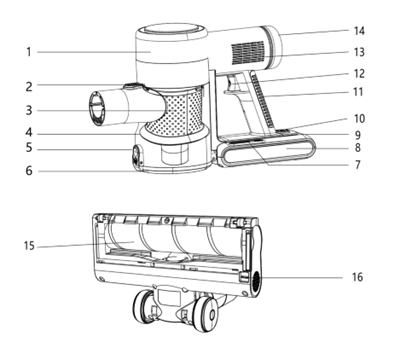
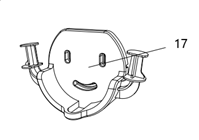
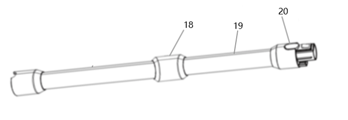
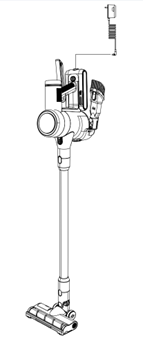
White Telescopic Rod Version
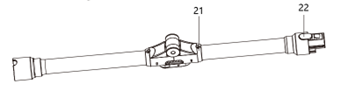
Gray Flexible Hose Version
- Main Body
- Dust Cup Release Button
- Metal Filter Component
- Dust Cup
- Dust Cup Cover Release Button
- Dust Cup Cover
- Power Level Button
- Battery Pack
- Charging Port
- Battery Pack Release Button
- Handle
- Power Button
- Exhaust Port
- HEPA Filter
- Floor Brush
- Floor Brush Release Button
- Wall Mount Bracket
- Telescopic Rod Release Button
- Telescopic Rod
- Telescopic Rod Main Unit Release Button
- Flexible Hose Release Button
- Main Body Release Button for Flexible Hose
Ⅲ. Operating Instructions
1. Installation Instructions
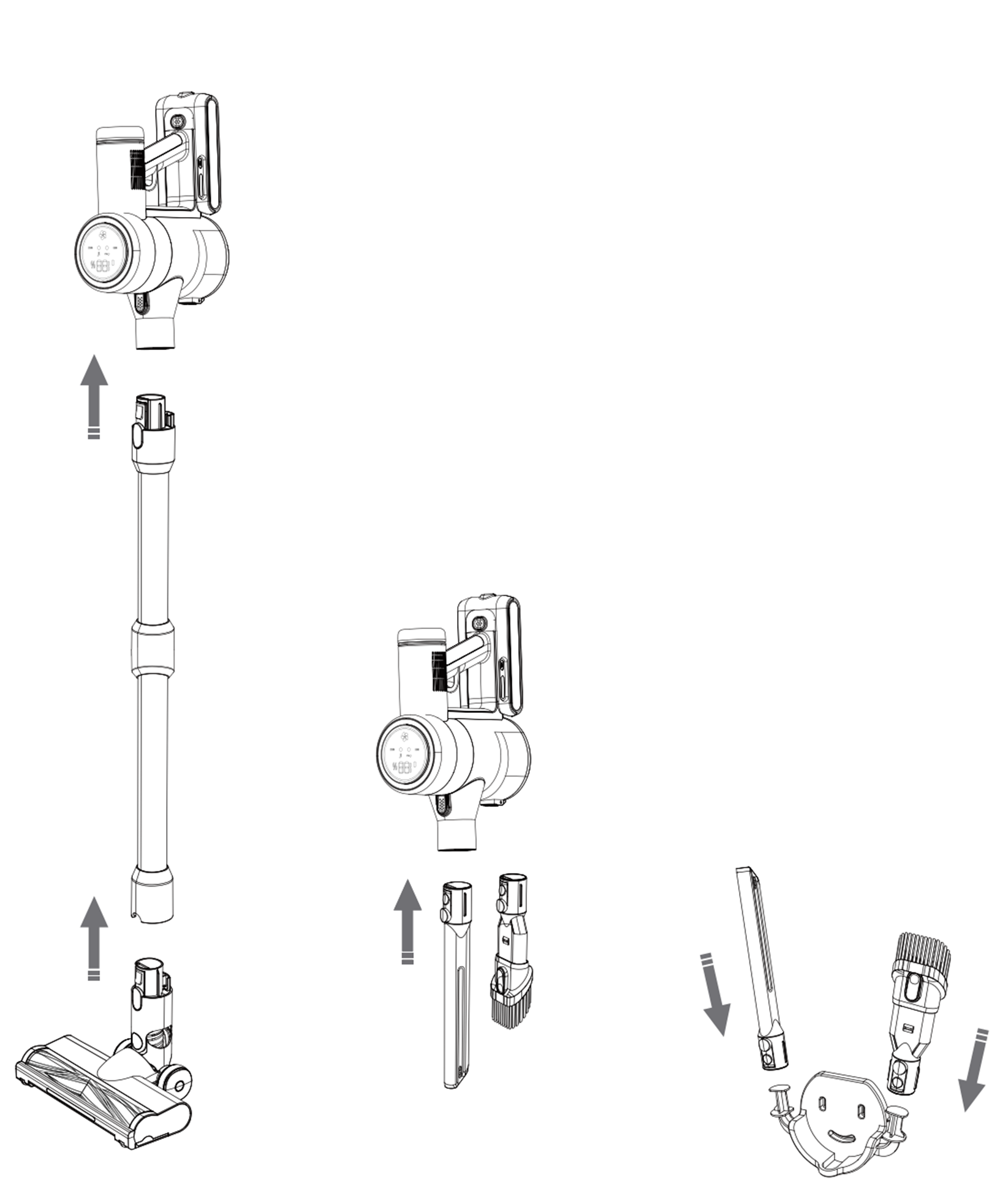
- Telescopic Rod/Flexible Hose: Align the main unit assembly with the telescopic rod/flexible hose and insert until a click sound is heard, indicating proper installation.
- Floor Brush Assembly: Align the telescopic rod with the floor brush assembly and insert until a click sound is heard, indicating proper installation.
- Other Brush Heads: Align the main unit assembly with the desired brush head and insert until a click sound is heard, indicating proper installation.
- Wall Mount Bracket: Fix the wall mount bracket on the wall with the included expansion screws for storing brush accessories. Drill a vertical hole with a matching drill bit, insert the expansion tube into the hole, then pass the screw through and tighten it. The bracket is suitable for concrete and solid cement walls. Do not use it on soft or hollow base
materials such as furniture and hollow bricks.
2. Disassembly Instructions
- Floor Brush Assembly: Press the telescopic rod /flexible hose release button, grasp the main unit handle and pull up to remove the floor brush assembly.
- Telescopic Rod /Flexible Hose: Press the main unit release button, grasp the main unit handle and pull up to remove the telescopic rod /flexible hose.
3. Control Panel Instructions
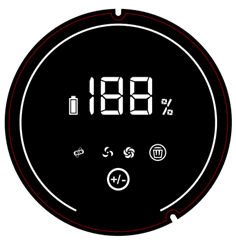
![]() Battery Indicator: Displays real-time battery level.
Battery Indicator: Displays real-time battery level.![]() Brush Jam Alert: Lights up when the brush is tangled, reminding the user to clean the brush.
Brush Jam Alert: Lights up when the brush is tangled, reminding the user to clean the brush.![]() Gear 1: Press once after startup to activate Gear 1.
Gear 1: Press once after startup to activate Gear 1.![]() Gear 2: Press twice after startup to activate Gear 2.
Gear 2: Press twice after startup to activate Gear 2.![]() Gear 3: Press three times after startup to activate Gear 3 (both indicators light up).
Gear 3: Press three times after startup to activate Gear 3 (both indicators light up).![]() Dust Cup Full Indicator: Reminds the user to clean the dust cup.
Dust Cup Full Indicator: Reminds the user to clean the dust cup.![]() Power Level Adjustment Button: Press lightly to cycle through the suction power levels.
Power Level Adjustment Button: Press lightly to cycle through the suction power levels.
 Battery Indicator: Displays real-time battery level.
 Brush Jam Alert: Lights up when the brush is tangled, reminding the user to clean the brush.
 Gear 1: Press once after startup to activate Gear 1.
 Gear 2: Press twice after startup to activate Gear 2.
 Gear 3: Press three times after startup to activate Gear 3 (both indicators light up).
 Dust Cup Full Indicator: Reminds the user to clean the dust cup.
 Power Level Adjustment Button: Press lightly to cycle through the suction power levels.
4. Charging Instructions
The vacuum cleaner can be charged in three ways.
The screen displays the battery level during charging, and the battery pack indicator flashes cyclically.
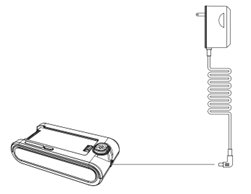
Method 1: Press the battery pack release button to remove the battery, then connect the charger for charging.
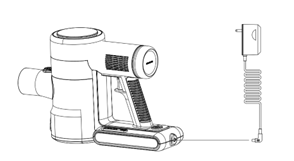
Method 2: Press the main unit release button, place the main unit on a horizontal surface, then connect the charger for charging.
Method 3: Lean the vacuum cleaner against the wall and connect the charger directly for charging.
5. Brush Accessory Instructions
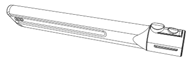
- Extended Nozzle: Suitable for cleaning narrow gaps such as window sills, bed frames and furniture gaps.
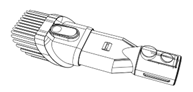
- 2-in-1 Brush Nozzle: Suitable for cleaning dust and hair on surfaces such as carpets, bedding and curtains.
6. Usage Instructions
-
- Fully charge the vacuum cleaner before use.
- Press the Power Button to turn on the device; both the screen and the battery pack display the remaining battery level. Press the button again to turn off the device.
![]()
- The device defaults to Gear 2 (purple light on) after startup.
- Height Adjustment (Telescopic Version): Press the Telescopic Rod Release Button, pull the extension tube up to the desired height, and release the button to lock the current height.
- Bending Function (Bendable Version): Press the Flexible Hose Release Button to bend the rod.
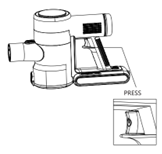
- Suction Adjustment: Press the Power Level Button or the on-screen power level adjustment button to adjust the suction power (3 gears in total).
|
Gear |
Gear 1 |
Gear 2 |
Gear 3 |
|
Screen Display Color |
Blue |
Purple |
Red |
|
Screen Display Icon |
 |
 |
 |
- Indicator lights on the floor brush assembly will glow green when the device is powered on.
Ⅳ. Cleaning and Maintenance
- Unplug the power supply and turn off the device before cleaning, and wait for the device to cool down completely.
- To extend the service life of the device, it is recommended to clean the HEPA filter at the air inlet and outlet monthly.
- Clean the dust cup in a timely manner when it is full; use a cleaning brush to remove tangled hair from the brushes and components.
- Wipe the outer casing with a soft, dry cloth. Do not use hard objects to avoid scratching the product surface.
- Do not immerse the entire device in water or rinse it under a faucet.
- Do not clean the device with steel wool, abrasive cleaners or corrosive liquids.
- Store all product components only after they are completely dry.
- For long-term storage, place the product in a dry and cool place, away from dust, high temperature and direct sunlight.
- Do not dry the product components in direct sunlight after cleaning.
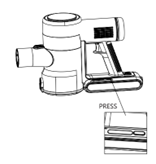
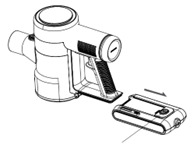
- Press the Battery Pack Release Button to remove the battery pack before cleaning the device.
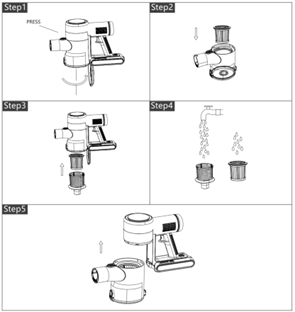
- Dust Cup Cleaning
- Press the Dust Cup Release Button, rotate the dust cup clockwise and remove it from the main unit.
- Take out the HEPA filter from the dust cup.
- Press the Dust Cup Cover Release Button, rotate the metal filter component counterclockwise and remove it from the dust cup.
- Rinse the HEPA filter, metal filter component and dust cup with clean water, then air dry them in a cool place (do not dry with heat).
- Reassemble all components after they are completely dry.
- Exhaust Port HEPA Filter Cleaning
- Rotate the exhaust port cover counterclockwise and take out the HEPA filter from the air outlet.
- Rinse the HEPA filter with clean water.
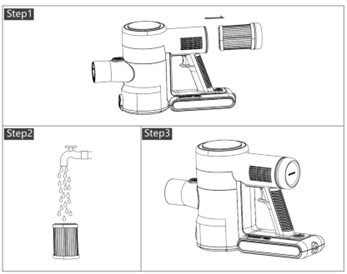
- Air dry the filter completely in a cool place, then reassemble it to the exhaust port.
- Floor Brush Cleaning
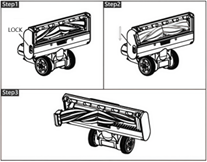
- Toggle the Floor Brush Release Button and remove the floor brush from the rod.
- Rinse the floor brush with clean water and remove any tangled hair or debris.
- Air dry the floor brush completely in a cool place, then reassemble it to the rod.
- Cleaning Brush Usage
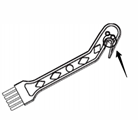
Use the cleaning brush to remove dust and debris from other brush heads; use the hidden blade at the tail of the cleaning brush to cut and remove severely tangled hair from the brushes.
Ⅴ. Warnings & Precautions
- Read this instruction manual carefully before using the product, and keep it in a safe place for future reference.
- This product is not suitable for use by people with physical, cognitive or mental impairments, or insufficient knowledge and experience (including children), unless they are under the direct supervision and guidance of a person responsible for their safety.
- Do not allow children to play with this product.
- Keep the product and its accessories out of the reach of children.
- Before use, confirm that the rated voltage of the product matches the local power supply voltage. Only use the original or manufacturer-specified power cord and charger.
- Do not use the product if the plug, power cord or the product itself is damaged, cracked or leaking electricity. Do not disassemble or modify the product by yourself; contact customer service immediately if any abnormality occurs.
- Do not plug in/unplug the charger or operate the device with wet hands.
- If the device emits smoke, unusual odor, overheats or deforms during operation or charging, cut off the power supply immediately and stop using the device; contact customer service if necessary.
- This product is for household use only. Do not use it for commercial, professional purposes or any unstated functions. Improper use in violation of this manual will void the warranty, and the manufacturer shall not be liable for any resulting losses.
- Always use the device under supervision; do not leave it running unattended. Disconnect the power supply before leaving, assembling, disassembling, cleaning or repairing the device.
- Fully charge the battery before the first use or long-term storage. If the product is not used for an extended period, charge it every three months to prevent deterioration of battery performance.
- Do not use the device to suck up water, detergents or other liquid substances.
- Do not use the device to suck up fine particles (e.g., flour, cement, gypsum powder) or large objects (e.g., toys, paper balls), as this may cause damage to the motor or clog the vacuum cleaner.
- Do not spill water or other liquids on the device or pour them into the device interior, to avoid short circuit and electrical damage.
- Clean the device with a dry cloth only; do not use gasoline, banana oil or other organic solvents, which may cause cracking or discoloration of the device body.
- If the operating time of the device is reduced due to diminished battery capacity, replace the battery with a new manufacturer-specified battery pack.
- Do not use or store the device in high or low temperature environments.
- It is recommended to use the device at room temperature between 0℃ and 40℃, and store it in a cool and dry place, away from prolonged direct sunlight.
- Unplug the charger after the device is fully charged or after cleaning the device.
- The battery pack is for exclusive use with this device; only use the original charger to charge the battery pack, and do not use it for any other purposes.
- Do not disassemble the battery pack or allow it to come into contact with liquids, to prevent battery damage or electric shock.
- Do not place the battery pack near high-temperature objects or open flame.
- Do not pierce or damage the battery pack with sharp objects, as this may cause fire, explosion or other hazards.
Ⅵ.Common Issues
|
Common Issues |
Possible Causes |
Solutions |
|
Displays 00 |
Battery has triggered over-discharge protection. |
Recharge the battery to activate. |
|
Displays E3 |
Motor overcurrent protection. |
Clean the dust cup and continue use. If the issue persists, contact customer service. |
|
Displays E2 |
Electrostatic alarm. |
Hold the metal part under the handle to release static electricity and resume operation. |
|
Displays E9 |
Roller brush tangled. |
Clean the roller brush and continue use. If the issue persists, contact customer service. |
|
Displays E7 |
Dust cup full. |
Empty the dust cup and continue use. If the issue persists, contact customer service. |
|
Displays E4 |
Discharge temperature protection.NTC short circuit or open circuit. |
The temperature is too high. Allow it to cool for 2 hours before use.Contact customer service. |
|
Displays E6 |
Incorrect adapter used.Adapter is faulty. |
Use the original adapter.Contact customer service. |
|
Low suction, unable to pick up debris |
Low battery level.Dust cup clogged, filter clogged.Floor nozzle/conductive tube clogged. |
Fully charge the battery before use.Empty the dust cup and clean the high-efficiency filter (allow it to air-dry completely before reuse).Check if the floor nozzle or conductive tube is clogged, clean and continue use. |
|
Battery runs out quickly |
Self-learning of the battery pack management chip not completed.Battery cell voltage difference is large. |
For a new machine, if the battery runs out quickly, fully discharge it (run the machine at high gear until the battery is empty) and then fully charge it.If this occurs after 1-2 months of use, the battery pack needs to be replaced. |
|
Unable to charge |
Battery pack is faulty.Roller shaft of the floor nozzle is stuck. |
Replace the battery pack if there is no response (black screen) on the screen.The roller brush dead icon on the main unit screen flashes to prompt you to clear foreign objects from the roller shaft before continuing use. |
|
Floor nozzle not rotating |
Conductive tube is faulty.Connection between the extension tube, electric floor nozzle and main unit is not properly installed. |
Insert the floor nozzle directly into the dust cup. If it works, replace the conductive tube.Reinstall the floor nozzle and conductive tube securely before use. |
|
Unable to fully charge |
Adapter is faulty.Power switch is faulty. |
Replace the adapter and contact customer service.Replace the main unit and contact customer service. |
|
Unable to turn on |
Dust cup is full.Battery pack is faulty. |
Empty the dust cup and continue use.Replace the battery pack and contact customer service. |
|
Unable to turn off |
Power switch is faulty.Battery pack is faulty. |
Replace the main unit and contact customer service.Replace the battery pack and contact customer service. |