

SIMPLUS Air Cooler LFSH007 User Manual SG&MY
Ⅰ. Product Parameters
|
Product Name |
MODEL NO |
Rated Power |
Rated Voltage |
Rated Frequency |
|
Air Cooler |
C03 |
85W |
220-240V~ |
50-60Hz |
II. Product Illustration
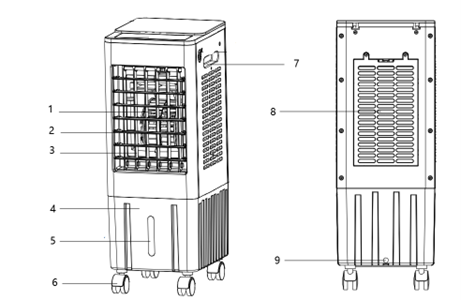
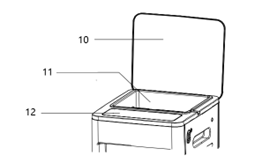
- Fan
- Manually Adjustable Fan Blades
- Automatically Adjustable Fan Blades
- Water Tank
- Water Level Visual Window
- Swivel Caster
- Handle
- Air Intake Mesh
- Water Tank Drain
- Top Cover
- Water Storage Tank
- Control Panel
III. Operation Instruction
Installation Instruction
1. Place the device on a stable surface with at least 50cm of space around it for proper ventilation.
2. Open the top lid of the product and check that all accessories are included.
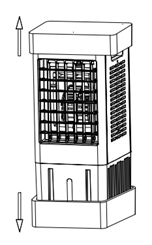
3. Take out the swivel caster.
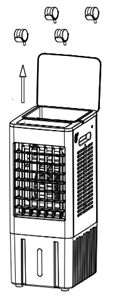
4. Invert the product and attach the swivel casters to the bottom of the water tank.
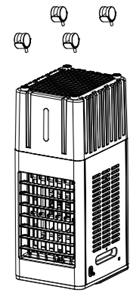
5. Installation complete.
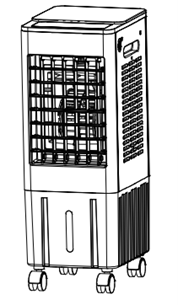
Filling the Water Tank Steps
The water tank can be filled through the reservoir on the top cover.
- Open the top cover.
- Add purified water or distilled water to the reservoir. The water will flow into the bottom tank. Observe the water level through the tank's visual window and ensure it does not exceed the max level.
Note: Unplug the power cord before adding water. Avoid water splashing into the motor or switch area to prevent electrical leakage. Please use purified or distilled water to ensure the product's lifespan.
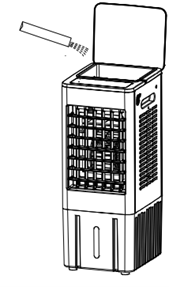
Ice Crystal Box Instruction
The Ice Crystal Box has unique cold storage and insulation features, making the fan's airflow cooler.
- Before first use, please fill the ice crystal box fully with water.
- Place the filled ice crystal box in the freezer for at least 3h.
- Place the frozen ice crystal box into the water tank, select “COOL” mode, and the outlet temperature will decrease.
Note:
- The ice crystal box can be refrozen and reused; it may also be used or not depending on the temperature.
- Do not open the ice crystal box lid to prevent damage and leakage.
- The ice crystal box cannot be consumed; keep it out of reach of children.
- The ice crystal box is made of eco-friendly, non-toxic, and harmless materials, and can be safely placed in the freezer.
- You can use ice cubes instead of the ice crystal box for freezing, which will have the same cooling effect.
Mechanical Version Usage Instruction
Plug the power cord into the outlet to start operation.
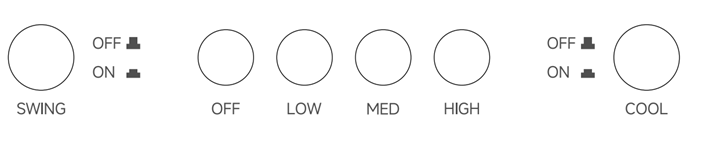
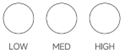 SPEED: Press the "LOW", "MED" and "HIGH" buttons to select speeds.
 OFF: Press to turn off the fan.
 SWING: Press this button to turn the air outlet swing function on or off.
 COOL: Press this button to turn the cool mode on or off.
Note: For the mechanical version, each function button must be turned off to completely shut down the device.
Electronic Version Usage Instruction
Plug the power cord into an outlet. After the product emits a beep and the display lights up, start operation.
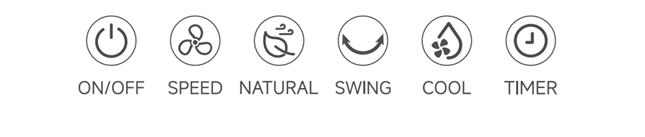
 ON/OFF: Press this button to turn the product on. Press again to turn it off.
 SPEED: Press to cycle through “F1”, ‘F2’, and “F3” to select low, medium, or high speed.
 NATURAL: Press to turn on natural airflow mode, where fan speed periodically cycles from high to low.
 SWING: Press to turn the air outlet horizontal swing function on or off.
 COOL: Press to turn the cool mode on or off. The water pump draws water from the tank, which is filtered through the cooling pad to cool the air.
 TIMER: Press this button when the device is running to turn on the timer function. Each press adds one hour, with the max setting of 12h. After setting, the timer counts down by the hour. When the timer ends, the product turns off and all functions stop. Long press the timer button to cancel the timer.
Note:
- When using the "COOL" function, ensure the water tank is filled with water.
- Adjust the vertical airflow direction by manually adjusting the fan blades.
Electronic Remote Control
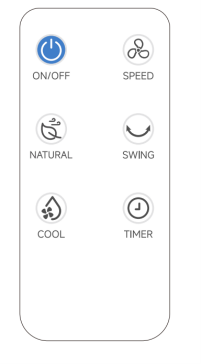
The remote control functions the same as the manual control panel.
Note:
- The remote control will not work if there are obstacles between the control and the product.
- The remote control's effective range is approximately 5m.
- Please avoid hitting or dropping the remote control to prevent damage.
- Please remove the batteries when the device will not be used for an extended period.
Ⅳ. Cleaning and Maintenance
- Press the power button to turn off the device, then wait 2min before cleaning or maintenance.
- Please wipe the exterior of the machine with a damp towel. Do not use corrosive cleaner. Do not submerge the entire unit in water or rinse it under the faucet.
- Do not pour hot water or corrosive cleaners into the water tank, otherwise it will damage the device.
- Please drain the water tank completely and dry all product components thoroughly before storage.
- This product should be stored in a dry, cool place during prolonged storage. Keep away from dust, high temperatures, and direct sunlight.
Water Tank Cleaning
- When not in use, promptly drain water at the bottom of the tank.
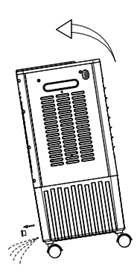
- Unplug the tank connector (as shown in the illustration, positioned beneath the tank), then tilt the product until the bottom tank is completely empty.
Cooling Pad Cleaning:
It is recommended to clean the cooling pad every two months to prevent clogging from dust or dirt.
- Remove the screws from the rear air intake mesh and take out the mesh.
- Remove the internal cooling pad.
- Clean the cooling pad: Wash it with lukewarm water (approximately 40°C) and mild detergent, then rinse with clean water and dry completely.
- Clean the rear air intake mesh: Clean with water and soft brush, then carefully reinsert it into the bracket.
Note:
- Do not dry the cooling pad in direct sunlight or by heating.
- Ensure the cooling pad is completely dry before reinserting it.
- Cautions
To ensure safety, this product has complied with all applicable standards and regulations. Please read the user manual carefully before using this product, and keep it for future reference.
- This product is not suitable for use by persons with physical, cognitive, or mental impairments, or those lacking knowledge or experience, including children, unless under the supervision and guidance of a responsible adult.
- Do not allow children to play with this product.
- Before use, ensure the marked voltage matches your local mains supply. Only use the original or manufacturer-specified power cord and charger.
- Do not use if the plug, power cord, or product is damaged. Do not disassemble or modify the product yourself. Please contact customer service immediately if any problem occurs.
- Do not plug or unplug the power cord or operate the device with wet hands.
- If smoke, unusual odors, excessive heat, deformation, or other problems occur during operation or charging, immediately disconnect the power and cease use. Contact customer service if necessary.
- This product is only suitable for household use. It is prohibited for commercial or professional use or functions other than those labelled in the manual. If not operated according to the manual, the return and exchange policy becomes void and the manufacturer will not be responsible for any losses.
- This product must be used under supervision, and it is prohibited to operate the device when no one is around. Please unplug the power supply before leaving/ assembling / disassembling / cleaning / repairing.
- Do not use this product near bathrooms or swimming pools.
- Please unplug the power cord before adding water. Avoid water splashing into the motor or switch area to prevent electrical leakage. Please use purified or distilled water to ensure the product's performance.
- Do not move the product when the water tank is full.
- When adding water to the tank, do not exceed the max water level.
- Do not use this product in damp, dusty or extremely hot environments.
- Do not use this product near curtains or fabrics that could be sucked into the air intake.
- Do not insert fingers or sharp objects into the ventilation mesh of this product.
- Place the device at least 50cm of space around it for proper ventilation.
Ⅵ.Common issues
|
Common Issues |
Possible Causes |
Solutions |
|
Cannot turn on the machine |
The power plug is not inserted or is not fully inserted. |
Reinsert the plug into the socket. |
|
The power outlet is not live. |
Turn on the socket switch or replace the power outlet. |
|
|
The power switch on the screen is not turned on. |
Turn on the switch and then click it again. |
|
|
The screen displays "—". |
Click the switch again. |
|
|
The timer function is enabled. |
Restart the machine. |
|
|
The fan is not working. |
Please contact customer service. |
|
|
The main control board is faulty. |
Please contact customer service. |
|
|
Product overheating |
Continuous operation for too long. |
Rest for 60 minutes before using again. |
|
Too much dust on the front or rear mesh. |
Clean the dust from the front and rear mesh. |
|
|
Abnormal noise |
The unit is placed unsteadily, causing vibration and noise. |
Place the air conditioner on a flat and hard surface, or place a "shock-absorbing pad" under the unit to reduce vibration and avoid co-vibration noise. |
|
The wind wheel is damaged. |
Check if the blades are damaged and contact customer service. |
|
|
Low air volume |
The gear is not switched. |
Click the "Fan" button to switch gears. |
|
Too much dust on the front or rear mesh. |
Clean the dust from the front and rear mesh. |
|
|
The rear mesh is too close to an obstacle. |
Move the machine to an open area. |
|
|
Screen blackout |
The machine has entered sleep mode. |
Press any panel button or use the remote control, and the screen will light up. |
|
The screen is damaged. |
Please contact customer service. |
|
|
Water leakage |
Water is added beyond the maximum water level. |
The water level should not exceed the MAX line of the water tank. |
|
The water tank plug is not installed properly. |
Install the water tank plug securely. |
|
|
Too much water is added at one time, causing water leakage at the water curtain. |
Add water evenly and slowly. |
|
|
Remote control unresponsiveness |
The remote control is not aimed at the infrared receiver. |
Bring the remote control close to the machine and aim it at the infrared receiver. |
|
An object is blocking the signal. |
Remove the obstruction and try again. |
|
|
The remote control is damaged due to external force. |
Check if the remote control has been dropped. |
|
|
No cooling |
The ice crystal box is not filled with water. |
1. For first use, fill the ice crystal box with water.2. Place the filled ice crystal box in the refrigerator and freeze for more than 3 hours.3. Place the frozen ice crystal box into the water tank, select the "COOL" mode, and the air outlet temperature will drop. |
|
The ice crystal box is not frozen. |
||
|
The "COOL" mode is not activated. |