

SIMPLUS BYJH005 Fabric Cleaner USER MANUAL
Ⅰ. SPECIFICATIONS
| PRODUCT NAME | MODEL NO | RATED POWER | RATED VOLTAGE | RATED FREQUENCY |
| Fabric Cleaner | BY01R | 1650W | 220-240V | 50-60Hz |
Ⅱ. IMAGES
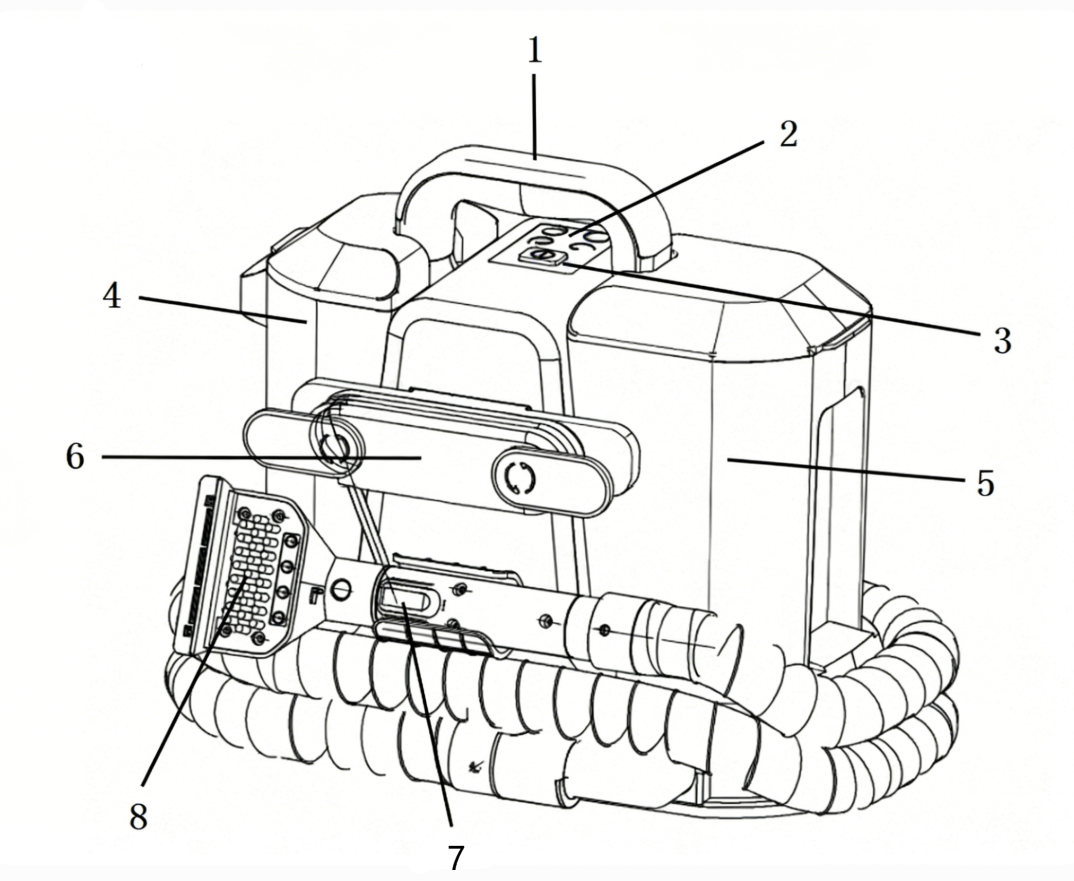
- Handle
- Control Panel
- Power Switch
- Clean Water Tank
- Dirty Water Tank
- Power Cord Hook
- Spray Button
- Brush Head Assembly
Ⅲ.INSTRUCTIONS
- Installation
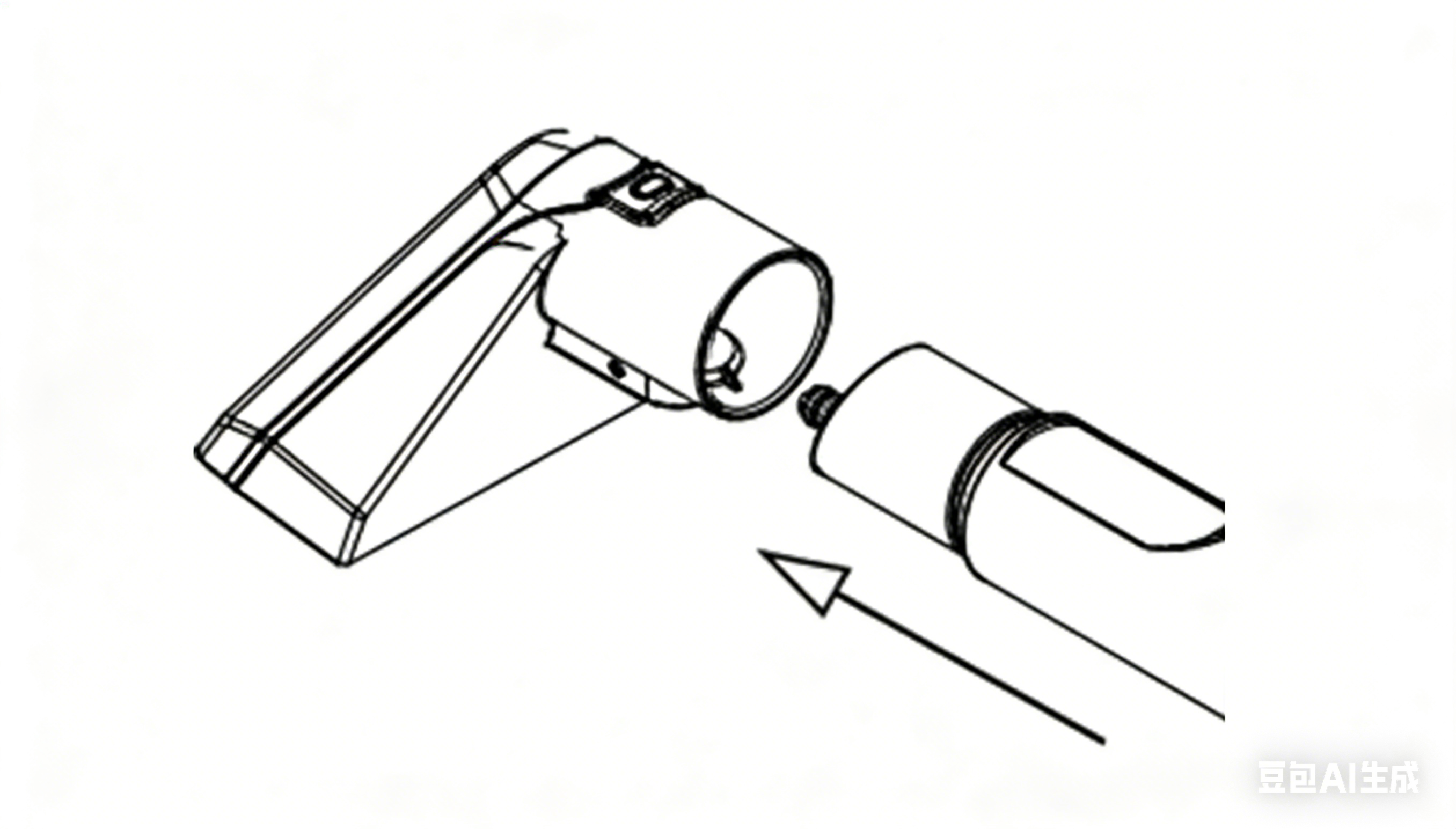
Brush Head Installation
- Align the hose handle with the rear end of the Brush Head Assembly, and attach it in the direction indicated by the arrow in the diagram.
Water Tank Installation & Removal
- Lift the Clean Water Tank and rotate to unscrew the cap. Fill the tank with clean water. Install the Clean Water Tank back into the machine and press it downwards.
- A “click” sound indicates that the tank is properly installed.
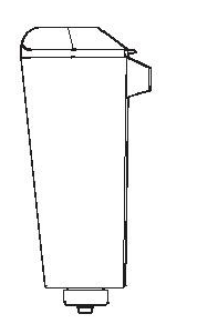
- Place the Dirty Water Tank into the machine and press it lightly. This indicates that the installation is complete.
- Ensure the water tank assembly and brush head assembly are properly installed and that the clean water tank contains sufficient water. The machine is now ready for use.
- Operating Instructions
- Unwind the Power Cord from the Power Cord Hook. Plug it into a power outlet.
- Press the Power Switch. All indicators will light up for 1 second and then turn off. The Cold Water mode indicator flash, indicating standby mode.
- The machine has four modes: COLD WATER; HOT WATER; STEAM & VACUUM; STEAM. In standby mode, press the corresponding button on the Control Panel to select a mode. Press the button again to return to standby mode.
Mode Details:
1:COLD WATER 2:HOT WATER 3:STEAM & VACUUM 4:STEAM
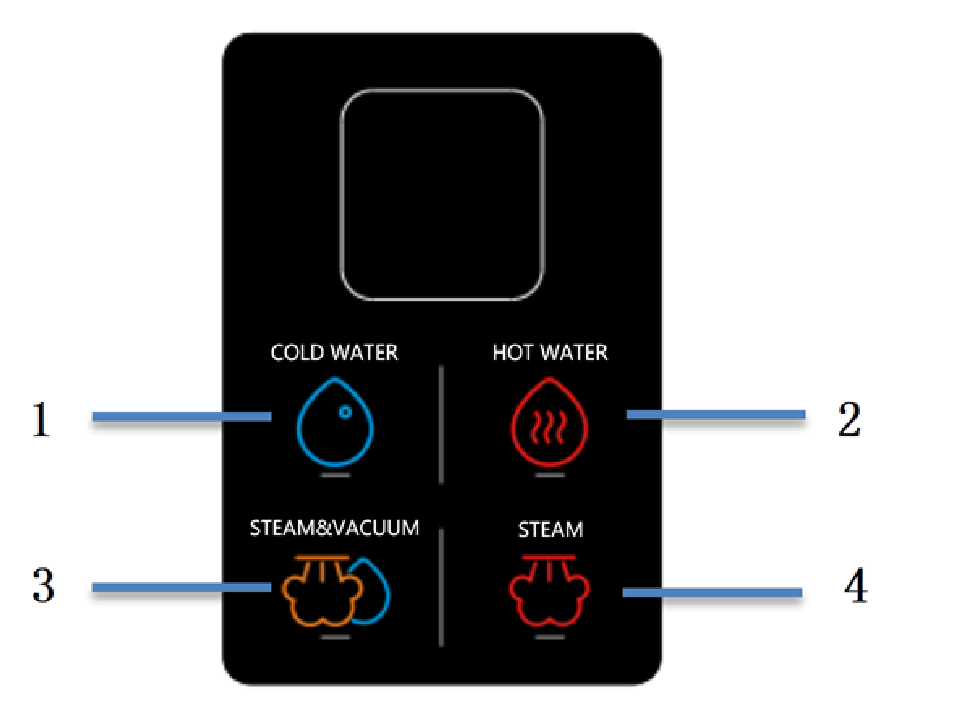
- COLD WATER: No waiting time required. Press the “COLD WATER” button on the Control Panel. The indicator light will stay on, indicating the mode is active.
- HOT WATER: No waiting time required. Press the “HOT WATER” button on the Control Panel. The indicator light will stay on. When pressing the Spray Button, the machine may spray cold water for about 10 seconds. This is normal.
- STEAM & VACUUM : First use requires about 30 seconds of preheating. Press the “STEAM & VACUUM” button on the Control Panel. The indicator light flashes during preheating and stays on when ready. When pressing the Spray Button, steam may be mixed with some hot water during the first 5 seconds. This is normal.
- STEAM: First use requires 30 seconds of preheat. Press the “STEAM” button on the Control Panel. The indicator light flashes while preheating and stays on when ready. This mode is mainly for fabric sanitizing and does not generate suction. Steam may mix with hot water for the first 5 seconds. It is recommended to wait until the steam stabilizes before use.
- NOTE:
- When switching from Steam Mode to Cold Water Cleaning Mode, hot water may continue to flow for about 20 seconds. Do not touch the water during this time.
- Spray / Steam Operation:Press and hold the Spray Button on the handle to spray water or steam. Release the button to stop. Aim the spray outlet at the stain to loosen it.
- Brushing & Suction:Release the Spray Button. Place the suction inlet on the wet area. Keep the Brush Head Assembly close to the fabric surface. Move it back and forth to absorb water and remove stains.
- NOTE:Ensure the air inlet at the rear of the hose is not blocked. Blockage may cause motor overheating or damage.
Ⅳ.CLEANING & MAINTENANCE
- To prevent mold or odor, clean and completely dry the Dirty Water Tank, Clean Water Tank and all related accessories after each use.
- Unplug the machine and allow it to cool down before cleaning.
- Wipe the exterior of the machine with a damp cloth.
- Do not immerse the machine in water or rinse it under a tap.
- Do not use steel wool, abrasive cleaners, or corrosive liquids.
- Use water below 60°C when cleaning accessories.
- Ensure all parts are completely dry before storage.
- Store the product in a cool, dry place for long-term storage.
- Keep it away from dust, high temperatures, and direct sunlight.
- Be sure to use the Simplus standard cleaning tablets.
- Never add high-foaming detergents to the clean water tank. High-foaming detergents include: liquid laundry detergent; laundry powder; dish soap; shampoo; hand soap; body wash; car wash detergent; toilet cleaner; carpet cleaner; degreaser; and similar products.
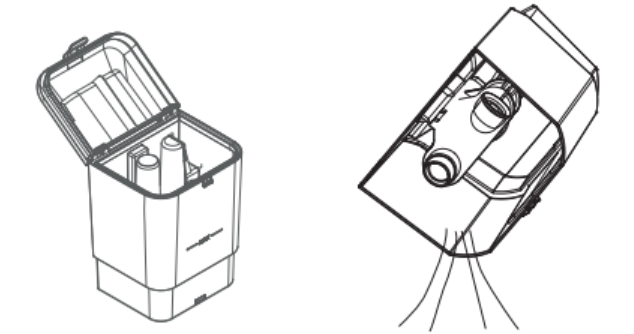
- Dirty Water Tank Cleaning:Remove the Dirty Water Tank from the machine. Take off the top cover of the Dirty Water Tank. Tilt the tank and pour out the wastewater.
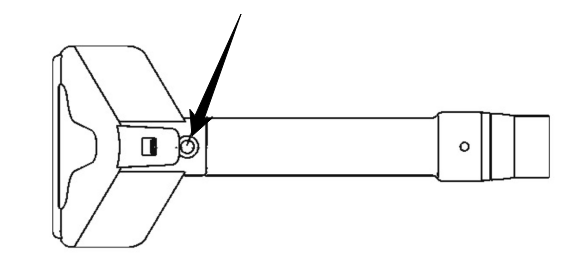
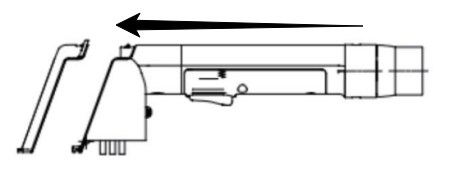
- Brush Head Assembly Cleaning:Press the release button to remove the Brush Head Assembly. Push the transparent cover latch in the direction shown by the arrow to remove the transparent cover. If there are stains inside the transparent cover, rinse it under running water. After cleaning and drying, reinstall the transparent cover onto the Brush Head Assembly.
- Self-Cleaning:
In standby mode, install the self-cleaning brush head. Press the “COLD WATER” button on the Control Panel to activate Cold Water Cleaning Mode. Press and hold the Spray Button. The machine will automatically enter self-cleaning mode to clean the internal pipes. Wastewater will flow back into the Dirty Water Tank. It is recommended to perform self-cleaning after each use. Recommended duration: 1 minute.
Ⅴ. PRECAUTIONS
- Read this manual carefully before use and keep it for future reference.
- Not suitable for people with physical or mental impairments and children, unless supervised.
- Do not let children play with the unit.
- Ensure the rated voltage matches local supply. Use only the original or manufacturer-specified power cord/charger.
- Do not add high-foaming detergents to the Clean Water Tank, such as laundry powder, liquid detergent, dishwashing liquid, hand soap, body wash, car wash liquid, toilet cleaner, carpet cleaner, or degreasing cleaners.
- Do not vacuum foam or foamy liquids.
- Do not fill the Clean Water Tank with water above 70°C.
- When there is liquid inside the Clean Water Tank or Dirty Water Tank, do not tilt the machine to prevent water from entering the motor.
- Do not use the product if the plug, power cord, or the machine is damaged, cracked, or leaking electricity. Do not disassemble or modify the product. Contact customer service if any abnormal condition occurs.
- Do not plug in or unplug the device with wet hands. Do not operate the machine with wet hands.
- If smoke, unusual odor, overheating, or deformation occurs during operation, immediately disconnect the power and stop using the machine. Contact customer service if necessary.
- This product is for household use only. Do not use it for commercial or professional purposes, or for functions not specified in this manual. Failure to follow the instructions will void the warranty, and the manufacturer will not be responsible for any damage.
- Do not leave the machine unattended while in operation. Always disconnect the power before leaving, assembling, disassembling, cleaning, or servicing the product.
- Do not touch high-temperature parts directly with bare skin to avoid burns and be careful when handling moving parts to prevent injury.
- Do not use or store the product near high-temperature areas.
- Do not run over the power cord with the machine.
- Do not use the machine if it is blocked. Turn off the power and remove the blockage before continuing use.
- Do not use the machine if the filter is clogged. Clean or replace the filter before use.
- Do not use the product if it malfunctions, makes unusual noise, emits odor or smoke, or has been dropped or damaged.
- Do not use the product if it has been dropped, damaged, left outdoors, or immersed in liquid.
- Do not trap the power cord under doors or pull it over sharp edges.
- Do not draw in foamy liquids.
- Do not add hot water exceeding 70°C to the clean water tank.
- Do not tilt the unit when there is liquid in the wastewater tank.
Ⅵ.TROUBLESHOOTING
| PROBLEM | POSSIBLE CAUSE | SOLUTION |
| Motor does not work | The power plug is not inserted or not fully seated. | Reinsert the plug into the socket. |
| The power outlet is not powered. | Turn on the socket switch or use a different outlet. | |
| The machine's power switch is off. | Turn on the switch | |
| The brush is damaged or worn, or the switch is faulty. | Contact after-sales service | |
| Suction is weak | The hose is blocked by foreign objects. | Remove the blockage and clean the hose. |
| Motor overheats | Continuous operation for too long. | Let it rest first, then use again. |
| Weak Suction | Hose, nozzle, or exhaust is blocked. | Clean the hose and nozzle. |
| Pipe is damaged or leaking. | Replace the hose. | |
| Poor sealing at the connection causing air leakage. | Tighten the connection seals. | |
| Body or exhaust pipe overheats | Used for more than 30 minutes | Let it rest for 5 minutes first. |
| Foreign object blocks the air inlet. | Remove the object and clear the passage. | |
| Cannot enter self-cleaning mode | Improper operation. | Press and hold the spray button; the machine will enter self-cleaning mode, cleaning the internal pipes, with wastewater returning automatically to the wastewater tank. |
| No water output | Improper operation. | Press and hold the spray button on the hose handle; the brush will start spraying water/steam. Release the button to stop. Align the spray holes on the stain to lift it from the surface. |
| No steam output | Improper operation. | Press and hold the spray button on the hose handle; the brush will start spraying water/steam. Release the button to stop. Align the spray holes on the stain to loosen it from the surface. |
| Water not fully absorbed | Not pressed tightly against the fabric surface. | Release the spray button, position the suction nozzle over the wet area, press the brush close to the stain, move back and forth to remove and absorb the stain from the fabric surface. |
| STEAM & VACUUM mode sprays water | Preheating is not complete; water in the pipes needs to be expelled. | Preheat takes about 30 seconds; mode indicator light stays on after preheating |