

Ⅰ. Product Parameters
|
Product Name |
MODEL NO |
Rated Power |
Rated Voltage |
Rated Frequency |
|
Table Fan |
FX-T37R |
50W |
220-240V~ |
50/60Hz |
Ⅱ. Product Illustration
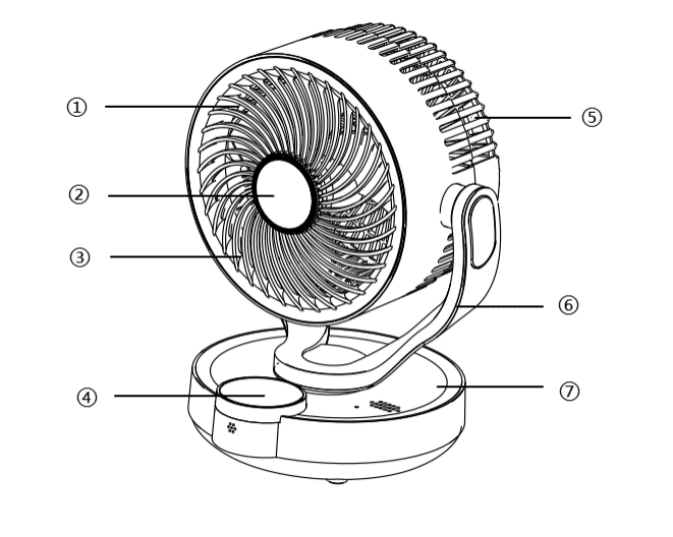
①Front Net
②Aromatherapy Lid
③Fan Blade
④Touch Panel
⑤Back Net
⑥Holder
⑦Base
Ⅲ. Operation Instruction
Please place the product on a horizontal surface for use; do not place it at an angle or upside down.
Tips: Do not forcefully adjust the direction of the fan head to avoid damaging the internal structure.
- Panel Functions
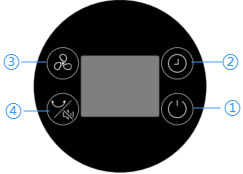
① Power On/Standby
- After connecting to the power supply, the screen displays "--" and enters standby mode, at the which the fan does not operate.
- After pressing this button, the fan will start operating, and the screen will display the default fan speed setting "F1"(Low speed).
- When the fan is running, press this button again to stop the fan. The screen will display "--" and return to standby mode.
② Timer
- When the fan is running, press this button, the screen will display “0h" and flash, indicating entry into timer setting mode.
- Press again to set the desired timer setting (0-12h), the digits on the display will flash during the setting process. After setting, wait for 3 seconds; the screen will return to display the present speed setting, and the timer function will start. When the preset time is reached, the fan will automatically turn off and enter standby mode.
③ Fan Speed
Press to switch gears; the display will simultaneously show the corresponding gear indicator (Low Gear F1 - Medium Gear F2 - High Gear F3).
④ Horizontal Swing/Silent Mode
- Short press to turn on the horizontal-swing function; press again to turn it off.
- Long press to activate silent mode, which turns off voice announcements. Press again to turn off silent mode.function.
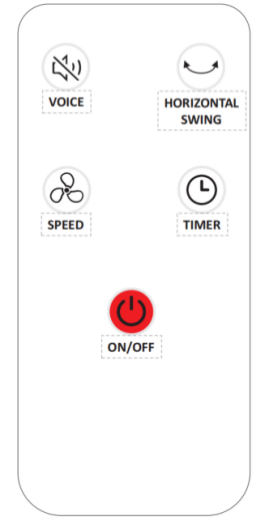
- Remote Control Mode
Please aim the front of the remote at the infrared receiver window on the device. Pressing the function buttons will control the device. Remote control will not work if the infrared signal is obstructed by objects. Store the remote controller carefully and avoid dropping it onto the floor.
3. Voice Control Instructions
- Place the fan in a quiet environment and use standard English for commands.
- Wake up the device by saying “Sim, Sim” before using the following commands.
- After waking up the system, the default operating time is 15s, and it can receive multiple commands during this period.
-
Please speak loudly and clearly
|
Command Types |
Voice Commands |
Voice Responses |
|
Wake Command |
Sim, Sim |
Yes, I'm here |
|
Control Commands |
Turn on the fan |
The fan is on |
|
Turn off the fan |
The fan is off |
|
|
Turn on horizontal |
Turn on horizontal |
|
|
Turn off horizontal |
Turn off horizontal |
|
|
Speed one |
Speed one |
|
|
Speed two |
Speed two |
|
|
Speed three |
Speed three |
|
|
Shutdown after one hour |
Shutdown after one hour |
|
|
Shutdown after X hours (2-12h) |
Shutdown after X hours (2-12h) |
|
|
Cancel the schedule |
Cancel the schedule |
|
|
Increase volume |
Increase volume |
|
|
Decrease volume |
Decrease volume |
|
|
Maximum volume |
Maximum volume |
|
|
Minimum volume |
Minimum volume |
|
|
Decrease speed |
Decrease speed |
|
|
Minimum speed |
Minimum speed |
|
|
Increase speed |
Increase speed |
|
|
Maximum speed |
Maximum speed |
|
|
Turn on voice broadcast |
Turn on voice broadcast |
|
|
Turn off voice broadcast |
Turn off voice broadcast |
|
|
Sleep Mode |
If no command is received within 15s, the device will exit wake-up mode. |
If you need anything, just ask. |
- Sleep Mode
- Place the fan in a quiet environment and use standard English for commands.
- Wake up the device by saying “Hello, Sim” before using the following commands.
- After waking up the system, the default operating time is 15s, and it can receive multiple commands during this period.
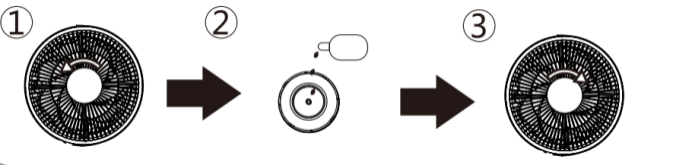
- Essence Addition Method
① Rotate the aromatherapy lid counterclockwise to remove it;
② Drip the essence onto the aromatherapy pad;
③ Rotate clockwise to attach the aromatherapy lid.
Ⅳ. Cleaning and Maintenance
- Before cleaning, unplug the power cord and allow the device to cool down.
- Please wipe the exterior of the machine with a damp towel. Do not submerge the entire unit in water or rinse it under a faucet.
- To clean the front net and fan blades, first rotate the lower fixed screw counterclockwise to remove it. Take out the front net and fan blades, then wipe away dust using a soft-bristled brush or damp cloth. Allow the product to air dry completely before reinstalling all components in the reverse order of disassembly.
- Do not clean with steel wool, abrasive cleaner, or corrosive liquid.
- Please allow all product components to dry completely before storing.
- This product should be stored in a dry, cool place during prolonged storage. Keep away from dust, high temperatures, and direct sunlight.
V. Cautions
- To ensure safety, this product has complied with all applicable standards and regulations. Before using this product, please read the user manual carefully and keep it in a safe place for future reference.
- This product is not suitable for use by persons with physical, cognitive, or mental impairments, or those lacking knowledge or experience, including children, unless under the direct supervision and guidance of a responsible adult.
- Do not allow children to play with this product.
- Keep this product and the power cord out of the reach of children.
- Before use, ensure the marked voltage matches your local mains supply. Only use the original or manufacturer-specified power cord and charger.
- Do not use if the plug, power cord, or product is damaged. Do not disassemble or modify the product yourself. Please contact customer service immediately if any problem occurs.
- Do not plug or unplug the power cord or operate the device with wet hands.
- If smoke, unusual odors, excessive heat, deformation, or other problems occur during operation or charging, immediately disconnect the power and cease use. Contact customer service if necessary.
- This product is only suitable for household use. It is prohibited for commercial or professional use or functions other than those labelled in the manual. If the operation is not carried out in accordance with the instructions in the manual, the warranty will be invalid and the manufacturer will not be responsible for any losses.
- This product must be used under supervision, and it is prohibited to operate the device when no one is around. Please disconnect the power supply before leaving/ assembling / disassembling / cleaning / repairing.
- Please connect the power supply only after the fan assembly has been completed. Disconnect the power supply when moving the fan.
- Do not insert fingers or sharp objects into the grille while the fan is running.
- Please avoid using this product in environments with high temperature, high humidity, or excessive dust, smoke, or other particulate matter. Keep the product at least 1 meter away from items that may absorb it, such as curtains, and keep it away from fire sources and combustible materials.
- Babies and the elderly should not be directly exposed to strong winds for long period of time.
- Do not place the fan on an inclined surface to prevent it from tipping over.
- Do not forcefully pull the product's swivel structure to avoid damaging it.
- Do not use this product around bathtubs, showerheads, or swimming pools.
VI. Common Problems
|
Common Problems |
Possible Reasons |
Solution |
|
Unable to power on |
Power plug not inserted or not in place |
Reinsert the plug into the socket. |
|
The power socket is not powered on |
Turn on the switch of the socket or replace the power socket |
|
|
The screen's power button is not turned on |
Turn on the power button, then press it again |
|
|
The screen displays "--" |
Press the power button again |
|
|
Timer function turned on |
Restart the device |
|
|
The fan is not working |
Please contact customer service to resolve it |
|
|
Motor terminal connections are loose |
Please contact customer service to resolve it |
|
|
Main control board failure |
Please contact customer service to resolve it |
|
|
Product overheating |
Continuous operation time is too long |
Rest for 60min before using again |
|
The front or back net accumulates a lot of dust |
Clean dust from the front and back net |
|
|
Abnormal noise |
The device is not placed on a stable surface, causing vibration-induced noise transmission. |
Place the fan on a stable surface or position a shock-absorbing pad beneath the device to reduce vibration transmission and prevent resonance noise. |
|
The fan blades damage |
Check if the fan blades are damaged. Please contact customer service to resolve it |
|
|
The wind speed is low |
Gear not shifted |
Press the fan button to select the desired speed setting. |
|
The front or back net accumulates a lot of dust |
Clean dust from the front and back net |
|
|
The back net is positioned too close to the obstacle. |
Move the device to an open area |
|
|
Screen blackout |
The device has entered sleep mode |
Press any panel button or use the remote controller to activate the screen |
|
Water entered the screen |
Please check whether water has entered the screen |
|
|
Screen damage |
Please contact customer service to resolve it |
|
|
No voice prompts |
Enter silent mode |
Press the horizontal swing button to cancel silent mode |
|
The remote control is not working |
Not aimed at the infrared receiver window |
Please place the remote control close to the device and aim at the infrared receiver window |
|
There is an obstruction |
Remove obstructions |
|
|
Remote control damaged by external force |
Please check if it has fallen from a height |
|
|
Voice control failure |
Products not yet activated |
Wake up the device by saying “Hello, Sim” before using the following commands |
|
No command is received within 15s |
After waking up the system, the default operating time is 15s, and it can receive multiple commands during this period |
|
|
Excessive ambient noise |
Place the fan in a quiet environment and use standard English for commands |