

Simplus Vacuum Cleaner XCQH018 User Manual
Ⅰ. Product Parameters
|
Product Name |
Model No. |
Rated Voltage |
Rated Power |
|
Vacuum Cleaner |
XCQH018 |
7.4V |
50W |
Ⅱ. Product Illustration
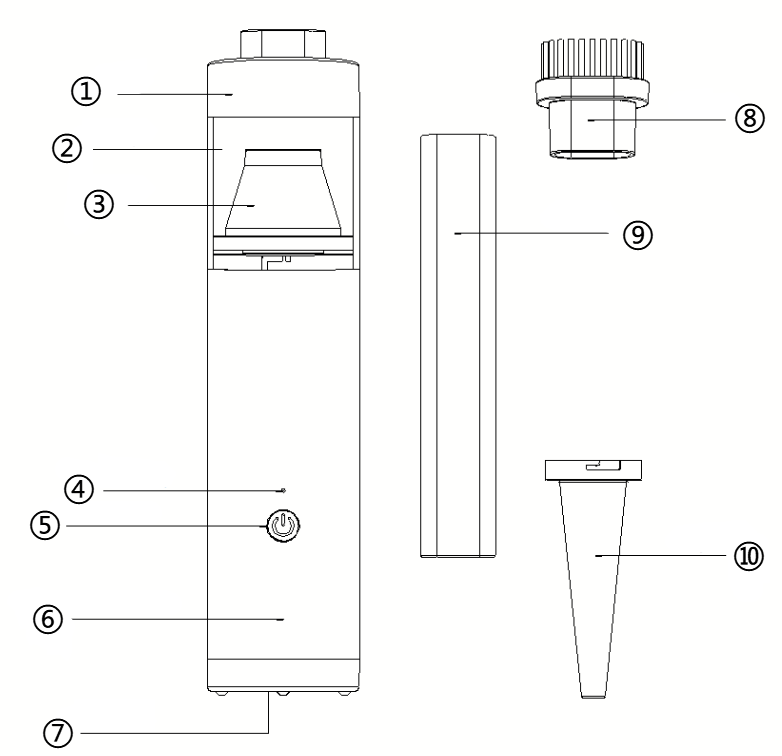
① Front Cover
② Dust Cup
③ HEPA Filter
④ Indicator Light
⑤ Power Switch Button
⑥ Charging Port (Back)
⑦ Air Outlet
⑧ Brush Nozzle
⑨ Flat Tube
⑩ Blowing Nozzle
Ⅲ. Usage Instructions
1. Turning the Vacuum On and Off:
When the battery is charged, long-press the power switch for over 3 seconds. The white indicator light will turn on, and the vacuum starts working at Gear 1. Press the power switch again to switch to Gear 2, and press again to return to Gear 1. Long-press the power switch for over 3 seconds to turn off the vacuum, and the white light will go out. A flashing red light indicates low battery.
2. Charging the Vacuum:
Use the Type-C charging cable. Ensure the power switch is off before charging. During charging, the red light below the charging port flashes to indicate charging, and the white light turns on when charging is complete. Unplug the power promptly after charging—do not overcharge.
3. Accessory Installation and Use:
① Extended Nozzle: Suitable for cleaning gaps in car doors, seats, cabinet corners, drawers, ashtrays, etc.
② Brush Nozzle: Fit over the extended nozzle for combined suction and wiping. Ideal for cleaning dust on cushions, car mat flocking, keyboards, etc.
③ Blowing Nozzle: Install on the air outlet by inserting and rotating to lock. Suitable for inflating small items like lifebuoys and balloons.
Ⅳ. Cleaning and Maintenance
-
Rotate to open the dust bin cover and pour out the dust.
-
Rotate the dust bin to remove or replace the filter for cleaning.
Ⅴ. Precautions
Read this instruction manual carefully before use.
Any operation inconsistent with the manual may cause serious personal injury or product damage.
This vacuum is an electric appliance and must be used under normal conditions. Never leave it running unattended.
-
Do not disassemble, repair, or modify the product unless by an authorized technician.
-
Do not block the air inlet or outlet during operation, as this may cause overheating and safety issues.
-
Ensure the switch is off before charging, and never use while charging.
-
Do not charge continuously for over 24 hours, or at temperatures below 0°C or above 40°C, as this will shorten battery life.
-
Do not inhale combustibles, such as burning cigarette butts.
-
The product is not waterproof. Never rinse the body with water, use in the bathroom, or suction wet surfaces.
-
If unusual conditions occur (e.g., strange odors, temperatures, or sounds) during charging or use, cut off the power and stop using immediately.
-
Do not leave the product in a sun-exposed car (outdoor parking), as high temperatures may cause accidents.
-
Store the product in a dry place, away from moisture.
-
The filter must be fully dried before reuse after cleaning.
-
The product must be used with a HEPA filter; otherwise, dust may enter the main unit.
-
This product is not suitable for persons with physical, cognitive, or mental impairments, or those lacking knowledge/experience (including children), unless under the supervision of a responsible person.
-
Keep out of reach of children.
Ⅵ. Troubleshooting
|
Issue |
Possible Cause |
Solution |
|
Machine does not work |
Battery is dead |
Recharge using a 5V, 1A power adapter as specified. |
|
Power switch not turned on |
Long-press the switch for 2 seconds to start. |
|
|
Other issues |
Contact after-sales service. |
|
|
Weak or no suction |
Dust cup is full |
Empty the dust cup. |
|
Dust cup needs cleaning/replacing |
Remove the filter, clean the dust cup, and clean/replace the filter. |
|
|
Machine failure |
Replace the machine. |
|
|
Dust leakage |
Dust cup is full |
Empty the dust cup. |
|
Filter not installed properly |
Reinstall the filter. |
|
|
Filter is broken |
Replace the filter. |