

SIMPLUS Electric Iron GTJH027 User Manual
Ⅰ. Product Specifications
| Product Name | Model No. | Rated Power | Rated Voltage | Rated Frequency |
| Electric Iron | 2805A | 1600W | 240V~ | 50/60Hz |
Ⅱ. Product Diagram
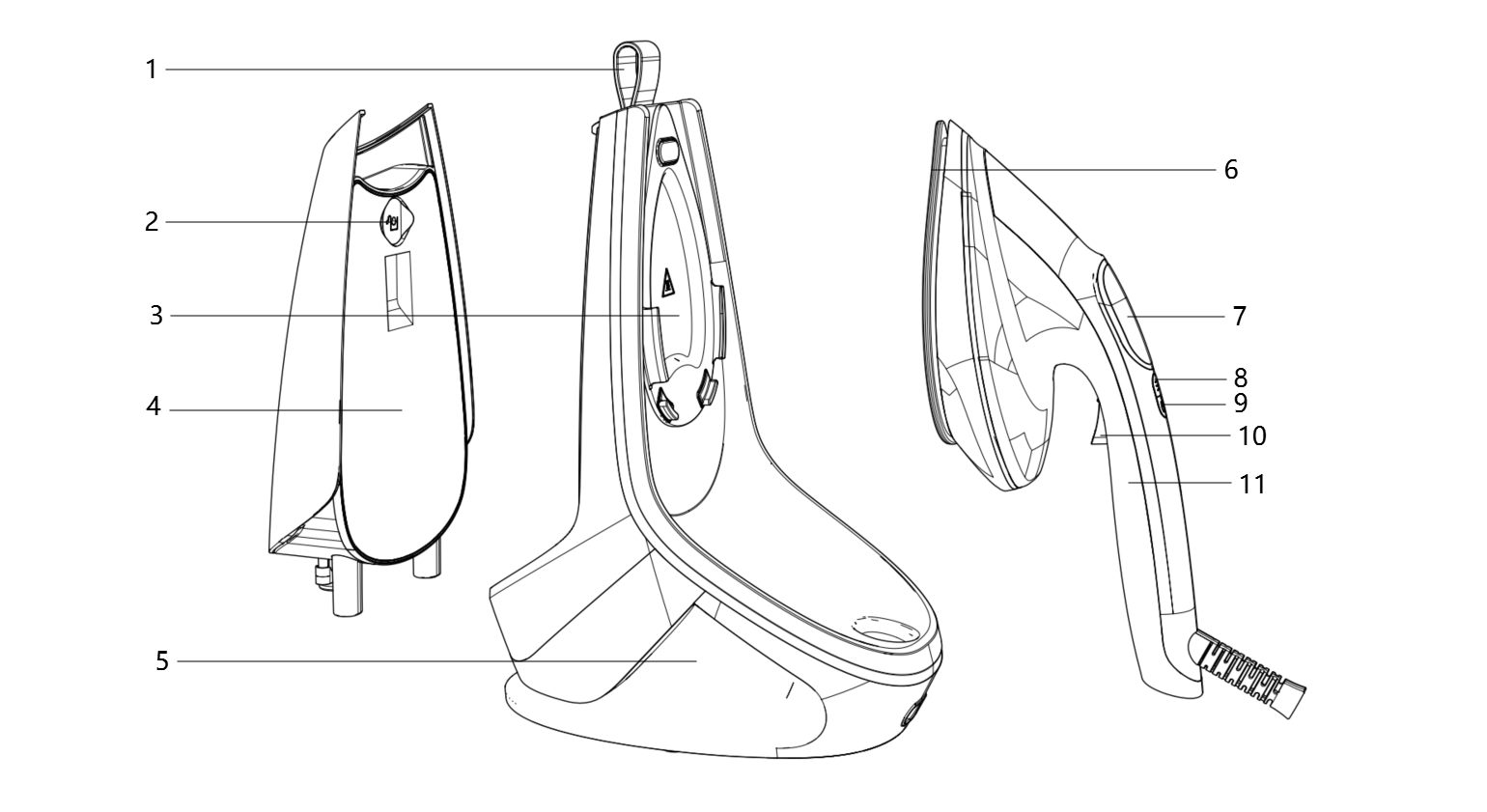
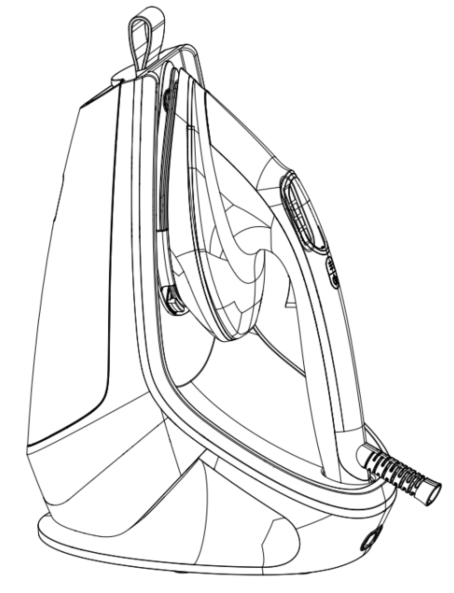
- Carry Handle
- Water Tank Fill Inlet
- Heat-Insulating Stand
- Water Tank
- Main Body
- Dry Ironing Plate
- Screen
- Mode Button
- Power Button
- Steam Button
- Grip Handle
Ⅲ. Operating Instructions
- Button and Indicator Overview
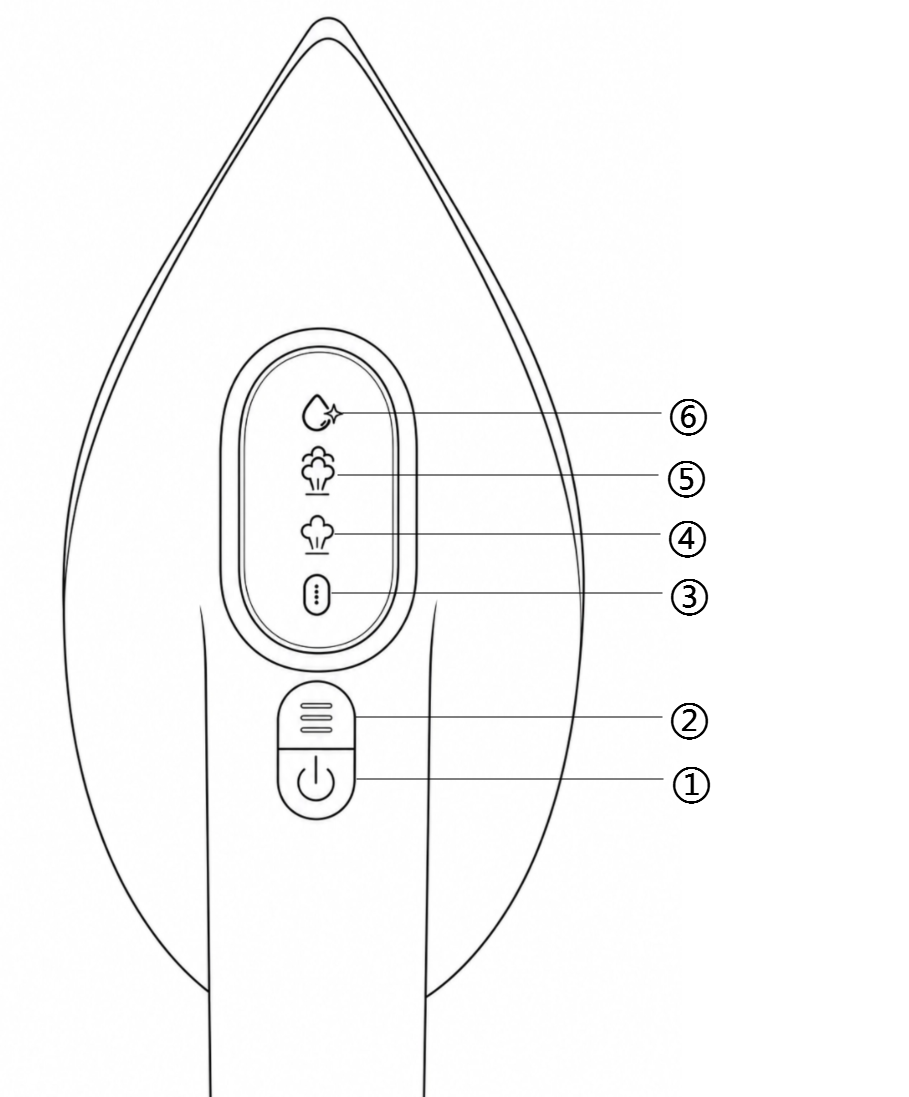
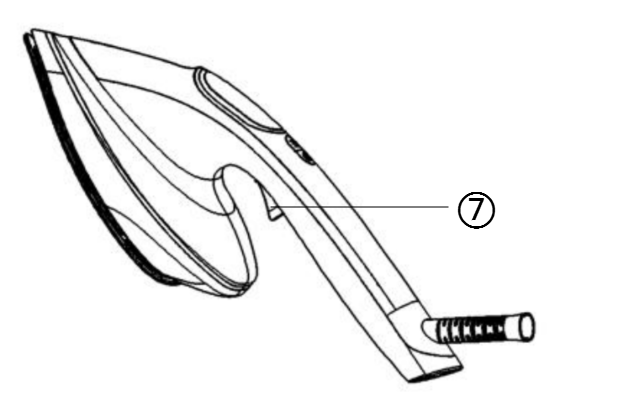
Buttons: ① Power Button; ② Mode Button; ⑦ Steam Button;
Screen Indicators: ③ Preheat/Dry Iron Mode; ④ Low Steam Mode; ⑤ High Steam Mode; ⑥ Self-Cleaning Mode;
- Preparation
This product features an integrated design and requires no complicated installation. Before first use, ensure all packaging materials have been removed.
Place and use the product on a stable, level surface.
- Instructions for Use
- Filling the Water Tank (for Steam Ironing)
- Fill the water tank before use. The product will only function properly after adding water.
- Remove the detachable water tank from the unit, and fill it with distilled or filtered tap water.
- After filling, slide the water tank back into the unit, ensuring it is securely in place.
Note: Do not use perfume, vinegar, starch, ironing aids, salt, or chemicals in the water tank.
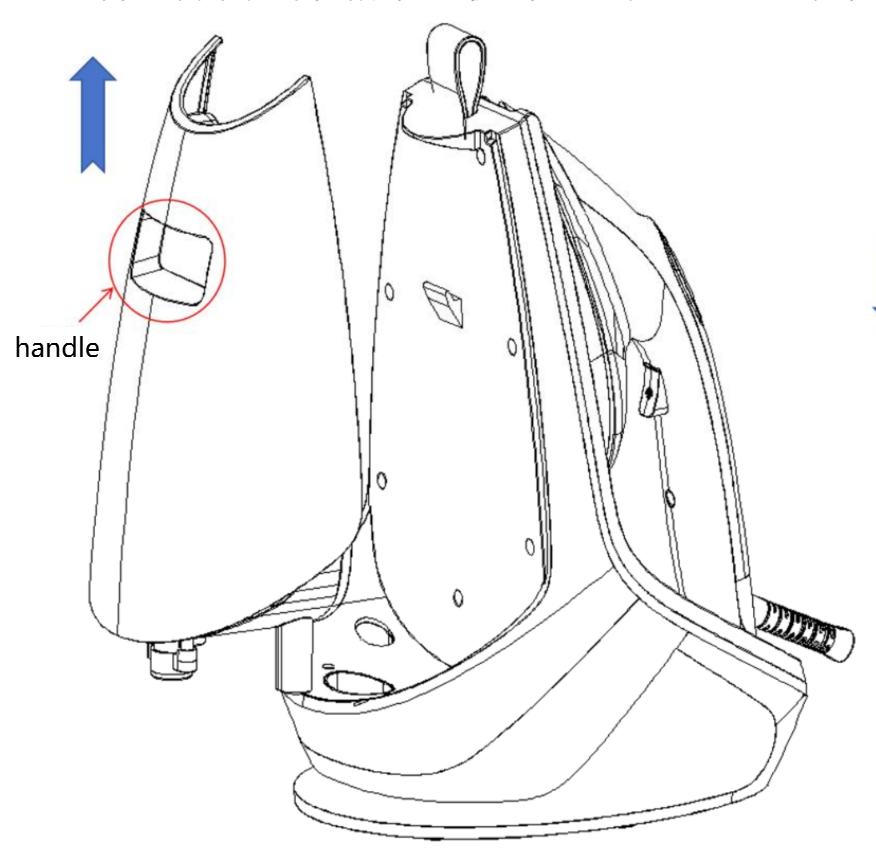
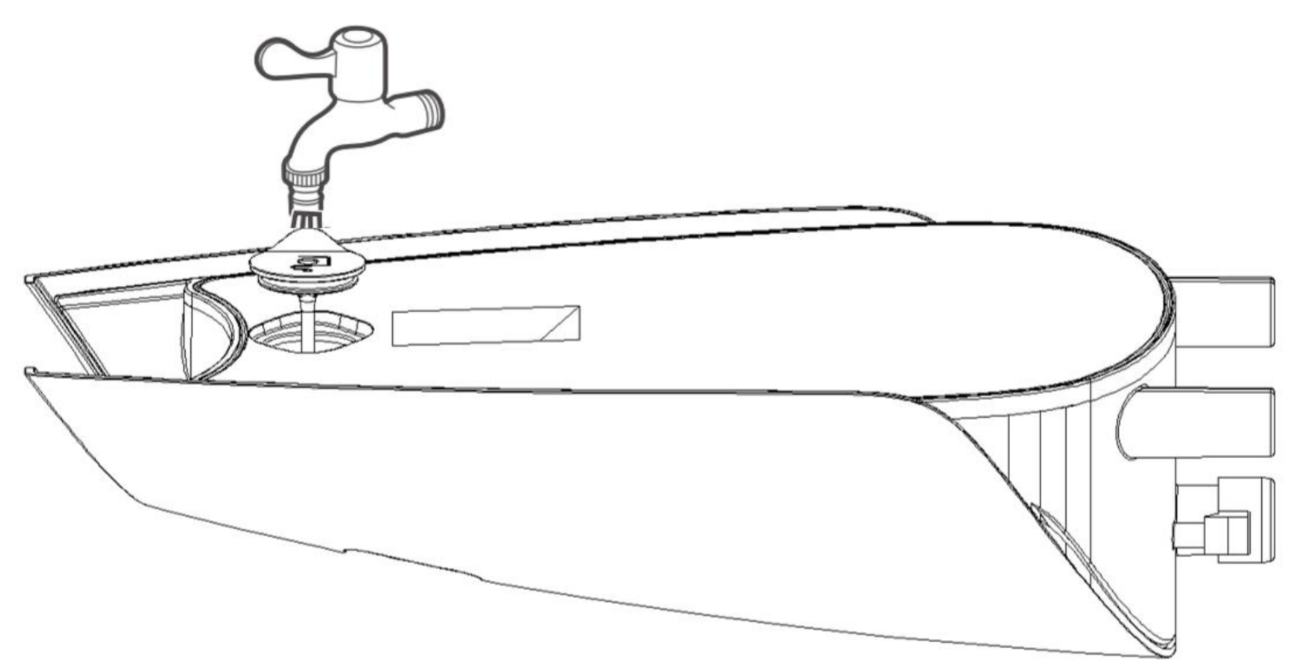
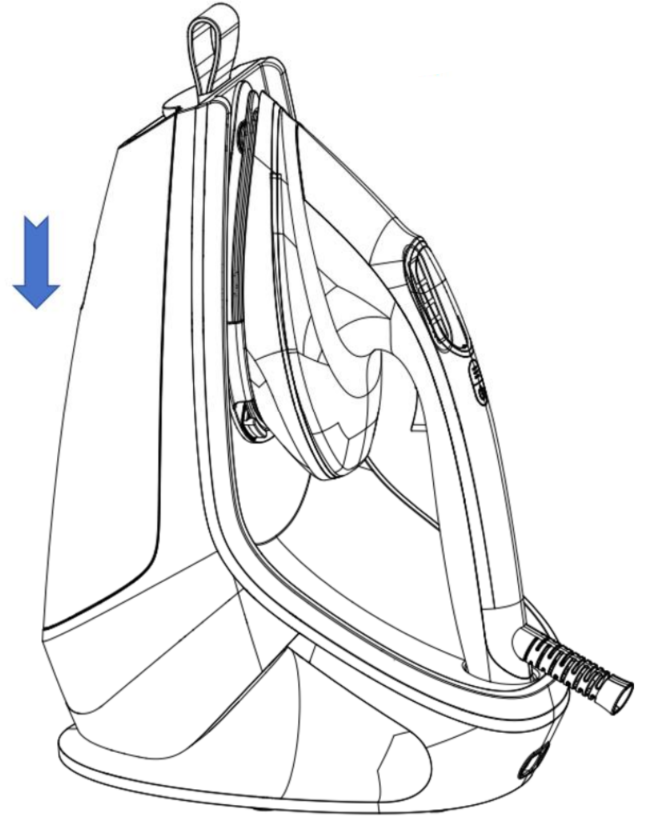
- Power On and Preheating
- Plug in the power cord and press the power button on the handle.
- The "Preheating/Dry Ironing" indicator on the screen will flash, indicating the product is in preheating mode. (Note: The mode switch button is not available during preheating.)
- After approximately 30 seconds, preheating is complete. The "Preheating/Dry Ironing" indicator will stay on, and the product defaults to Dry Ironing mode.
- Mode Adjustment
- Select the desired working mode.
- When preheating is complete, press the Mode Button to cycle between working modes: Dry Ironing → Low Steam → High Steam → Dry Ironing.
- The corresponding indicator on the screen will light up when a mode is selected.
- Steam Operation:
- In Low Steam or High Steam mode, the product releases steam.
- Continuous Steam: In steam mode, press and hold the Steam Button on the handle for continuous steam release. Release the button to stop steam.
- Auto Continuous Steam: In steam mode, double-press the Steam Button to automatically enter continuous steam mode. Press once again to exit.
- Steam Burst: In any steam mode, press the steam button three times consecutively to activate Steam Burst mode, which unleashes a powerful blast of steam. (Note: After each Steam Burst, wait 15 seconds before using it again.)
Note: This product features an auto shut-off function. If no ironing is performed within 15 minutes while the appliance is on, it will automatically power off to save energy and eliminates hazards. At that time, the indicator lights will flash in sequence as a reminder.
- Self-Cleaning Mode:
- Prepare a container that can hold at least 200ml of water.
- Fill the water tank with an appropriate amount of water.
- Point the iron soleplate towards the container, select any steam setting, and press the steam button on the handle five times consecutively. The appliance will enter self-cleaning mode, which will last for 2 minutes.
- Regular use of the self-cleaning function effectively removes limescale and impurities deposited in the steam chamber and soleplate vents, prevents clogging of the steam holes, ensures strong and even steam output, and extends the product's service life.
Note: During self-cleaning mode, hot water will spray from the soleplate. Be careful to avoid burns!
IV. Cleaning and Maintenance
- Preparation Before Cleaning:
① Press the power button to turn off the appliance, unplug it, and wait for it to cool down completely before cleaning to avoid burns.
② Place the iron upright and empty the remaining water in the tank.
③ Exterior cleaning: Wipe the exterior with a damp cloth. Do not immerse the entire appliance in water or rinse it under a faucet.
- Water Tank Cleaning and Storage: When not in use for an extended period, remove the water tank, pour out any remaining water. Reinstall the empty tank, power on and heat the iron without water to vaporize residual moisture inside the soleplate, preventing internal scale buildup.
- Storage Environment: For long-term storage, keep the product in a dry, cool place away from dust, high temperatures, and direct sunlight.
- Cleaning Limescale from Steam Holes: If limescale appears in the steam holes, first use a bamboo skewer to remove it, then wipe the soleplate clean with a damp cloth.
- Self-Cleaning Function: It is recommended to use the self-cleaning function every 3 months to prevent accumulated limescale and impurities from clogging the steam holes.
V. Precautions
- Before using this product, please read these instructions carefully and keep them for future reference.
- Do not direct the iron at people, animals, or flammable objects while in use.
- Never iron clothes while they are being worn.
- When using the appliance, take care to prevent spraying steam from causing injury.
- Do not touch the steam during use, and do not touch the hot soleplate or surrounding hot parts to avoid burns.
- Do not place the appliance directly on surfaces that are not heat-resistant, such as glass, to avoid danger.
- It is recommended to use the iron on a well-ventilated ironing board.
- This product is not intended for use by persons with physical, sensory, or mental disabilities, or lack of experience and knowledge, or children, unless they are supervised or instructed by a person responsible for their safety.
- Do not allow children to play with the product, and keep it out of reach of children.
- Before use, ensure the rated voltage matches the local power supply. Only use the original or manufacturer-specified power cord.
- If the plug, power cord, or product itself is damaged, cracked, or has electrical leakage, do not use it. Do not disassemble or modify the product yourself. If any abnormality occurs, contact customer service promptly.
- Do not plug or unplug the power cord or operate the device with wet hands.
- If the device emits smoke, abnormal odors, becomes excessively hot, or deforms during operation or charging, immediately disconnect the power and stop using it. Contact customer service if necessary.
- This product is intended for household use only. Do not use for commercial, professional, or any functions not specified in the manual. If not used as instructed, the warranty will be void, and the manufacturer shall not be liable for any resulting losses.
- This product must be used under supervision. Do not leave it running unattended. Disconnect the power before leaving, assembling, disassembling, cleaning, or repairing.
- Do not touch hot parts with bare hands to avoid burns. When operating moving parts, take precautions to avoid scratches.
- This product must be plugged into a grounded power outlet, and ensure the plug is fully inserted.
- Do not use the device near bathtubs, showers, washbasins, or other water containers.
Ⅵ. FAQ
| Common Problems | Possible Causes | Solutions |
| After plugging in and pressing the power button, the unit has no response and the screen does not light up | The plug is not fully inserted; | Reinsert the plug firmly; |
| The outlet has no power; | Check if the outlet is functioning properly; | |
| The power button was not pressed | Press the power button on the handle | |
| After powering on, the indicator light keeps flashing and the device cannot be used. | The product is in preheating mode. | Wait about 30 seconds. Once preheating is complete, the indicator light will remain steadily on for normal operation. |
| The heating component is heavily scaled, causing slow heating. | Run the self-cleaning function to remove scale. | |
| Unable to switch modes after preheating is complete. | Preheating is not completely finished; the machine has locked the mode switching function. | Wait until the preheat indicator light is steadily on, then press the mode switch button to change modes. |
| No steam is emitted when the steam button is pressed. | Water tank is empty. | Fill the water tank and install it properly |
| Not operating in steam mode | Confirm the current mode is low or high steam mode | |
| Steam holes blocked by limescale | Run self-cleaning mode to clear the steam channel | |
| Steam Burst mode cannot be activated | Interval between two uses less than 15 seconds | Wait for 15 seconds before triggering again |
| Steam output is weak or uneven | Steam nozzle blocked by limescale | Use the self-cleaning function (press the steam button five times consecutively), or cool the machine completely and clear the scale using a bamboo skewer. |
| Sudden automatic power-off during use. | Auto shut-off function triggered (no operation for 15 minutes). | This is a normal protection function. Press the power button again to resume use. |
| No response after starting the self-cleaning mode. | Not in steam mode, or insufficient button presses. | Confirm the current mode is low/high steam mode, then press the steam button five times consecutively. |
| Water tank is empty; | Fill the water tank with an appropriate amount of water; | |
| White powder or scale residue on the soleplate. | Use of mineral-rich tap water | Switch to purified or filtered water; regularly use self-cleaning function to remove scale |