

Ⅰ. Product Parameters
|
Product Name |
MODEL NO |
Rated Power |
Rated Voltage |
Rated Frequency |
|
Air Purifier |
KJ152DW |
18W |
100-240V~ |
50/60Hz |
Ⅱ. Product Illustration
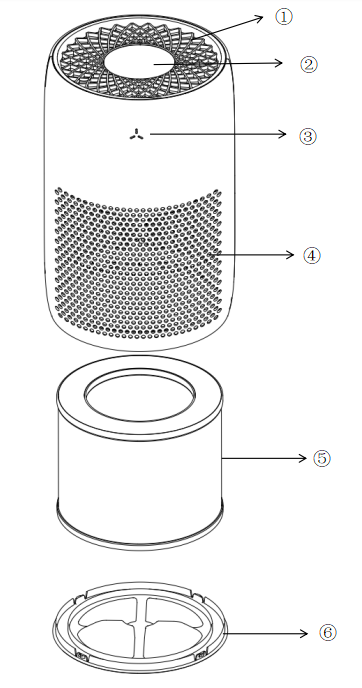
①Air Outlet
②Control Panel
③PM2.5 Indicator Light
④Air Inlet
⑤Filter Element
⑥Base
III. Operation Instructions
Installation Instruction
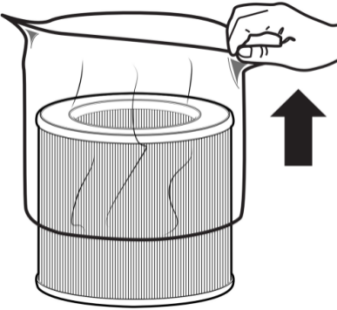
The air purifier includes the original filter. Please remove the filter packaging before use.
1. Rotate the device 180° and flip the base cover.
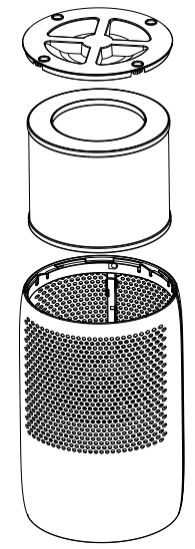
2. Take out the HEPA filter from inside the machine and remove the outer plastic bag.
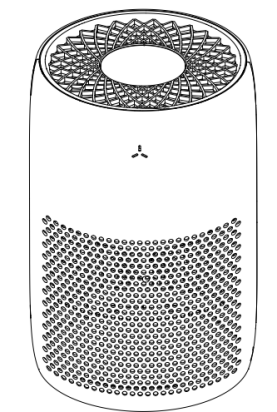
3. Replace the HEPA filter into the device, close the base cover clockwise, then turn on the device for normal use.
3.2 Instructions for Use
Plug in the power cord. The device sounds a “beep” and all lights illuminate for a self-check (PM2.5 indicator lights display green, yellow, and red). After 3s, it enters standby mode. All indicator lights are extinguished in standby mode.
APP Version Interface
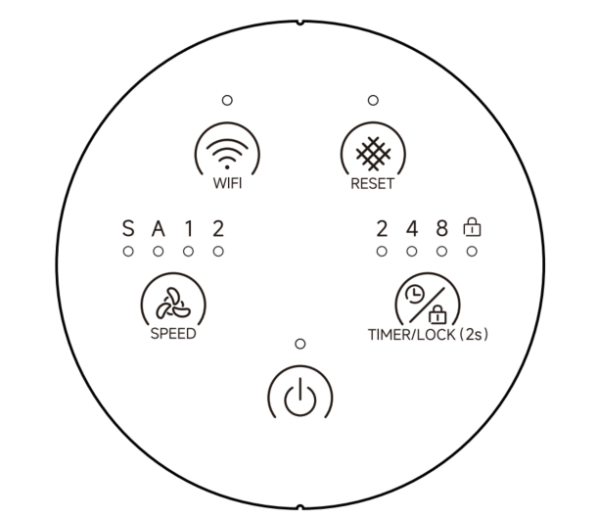

Power Button
- Short pressto turn on the device; it will default to auto mode. Press again to turn off the device. At this time,the power button and auto mode indicator light up, the Wi-Fi indicator flashes, and all other indicators are off.
- After startup, PM2.5 detection automatically begins. During detection, the green light illuminates and the speed operates at S mode. After 30s, the current air quality level is displayed.

Speed Button
When turned on, press to switch between S/A/1/2 settings, with the corresponding indicator light illuminating.
- S Sleep mode: After switching tosleep mode, the device will enter sleep after 3s of no operation. The sleep indicator lights up, other lights turn off, and the tri-colour light turns off. If child lock is turned on, the child lock indicator light remains illuminated. The fan operates at sleep mode. Press any button to wake the device; press the power button to turn it off immediately.
- AAuto mode: Automatically switches between S/1/2 settings based on air quality.
|
PM2.5 Concentration (μg/m³) |
Gear |
PM2.5 Concentration Index Levels and Corresponding Colours |
|
|
1–50 |
S gear |
Excellent |
Green |
|
51–150 |
1 gear |
Good |
Yellow |
|
151–500 |
2 gear |
Poor |
Red |
- 1Low fan speed gear
- 2 High fan speed gear

WiFi Button
Long Press 3s to enter network connection mode. The WiFi indicator light will flash . If the connection is successful, the indicator light will remain illuminated. If no connection is established within 3min, the indicator light will turn off and the connection process will stop.

Filter Reset Button
After the filter has been used for over 2000 hours, the filter reset indicator light will flash to remind you to replace it. After replacement, long press this button for 2s. The indicator light will flash for 2s before turning off, and the device can be used normally.

Timer/Child Lock Button
- Short Press to turn on the timed turn-off function (2h/4h/8h). The corresponding time indicator light will illuminate. After the timer ends, the device will automatically turn off and enter standby mode.
- Long pressthis button for 2s to activate the child lock function; the child lock indicator light will illuminate. If any other button is pressed at this time, the child lock indicator will flash three times to indicate that the system is currently locked. Long press this button again for 2s to turn off the child lock. The corresponding indicator light will turn off, and all buttons will resume normal operation.
Non-APP Version Interface
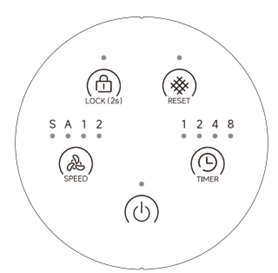
 Power Button
- Short press to turn on the device; it will default to auto mode. Press again to turn off the device. At this time,the power button and auto mode indicator light up.
- After startup, PM2.5 detection automatically begins. During detection, the green light illuminates and the speed operates at S mode. After 30s, the current air quality level is displayed.
 Speed Button
When turned on, press to switch between S/A/1/2 settings, with the corresponding indicator light illuminating.
- S Sleep mode: After switching to sleep mode, the device will enter sleep after 3s of no operation. The sleep indicator lights up, other lights turn off, and the tri-colour light turns off. If child lock is turned on, the child lock indicator light remains illuminated. The fan operates at sleep mode. Press any button to wake the device; press the power button to turn it off immediately.
- A Auto mode: Automatically switches between S/1/2 settings based on air quality.
|
PM2.5 Concentration (μg/m³) |
Gear |
PM2.5 Concentration Index Levels and Corresponding Colours |
|
|
1–50 |
S gear |
Excellent |
Green |
|
51–150 |
1 gear |
Good |
Yellow |
|
151–500 |
2 gear |
Poor |
Red |
- 1 Low fan speed gear
- 2 High fan speed gear
 Child Lock Button
- Long press this button for 2s to activate the child lock function; the child lock indicator light will illuminate. If any other button is pressed at this time, the child lock indicator will flash three times to indicate that the system is currently locked. Long press this button again for 2s to turn off the child lock. The corresponding indicator light will turn off, and all buttons will resume normal operation.
 Timer
Timer
- Short Press to turn on the timed turn-off function (2h/4h/8h). The corresponding time indicator light will illuminate. After the timer ends, the device will automatically turn off and enter standby mode.
3.3 Smart Life App Connection and Usage
Only available for the app version. The Smart Life APP supports Android and iOS systems. Scan the corresponding QR code to directly access the download page.
Wi-Fi Connection Method
This device connects via router Wi-Fi. Ensure the Smart Life APP is installed and a user account is created.
Place the device approximately 5m from the router.
After powering on the device, long press the Wi-Fi button for 2s to connect. If network configuration fails within 3min, the process will automatically cancel and the indicator light will turn off. To reconnect to Wi-Fi, long press the Wi-Fi button for 2s to start the pairing process. The Wi-Fi indicator light will begin flashing again.
Method
When the Wi-Fi indicator flashes, select 'Add Device' → 'Small Appliances' → 'Air Purifier' within the app, then follow the on-screen prompts. Check the Wi-Fi indicator status. If it flashes rapidly, the connection is complete.
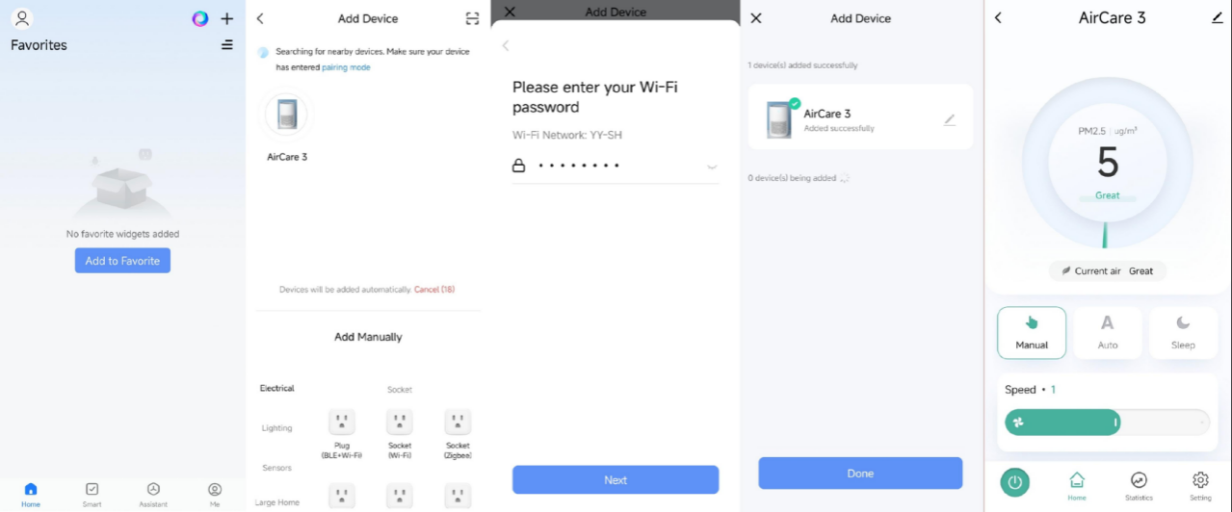
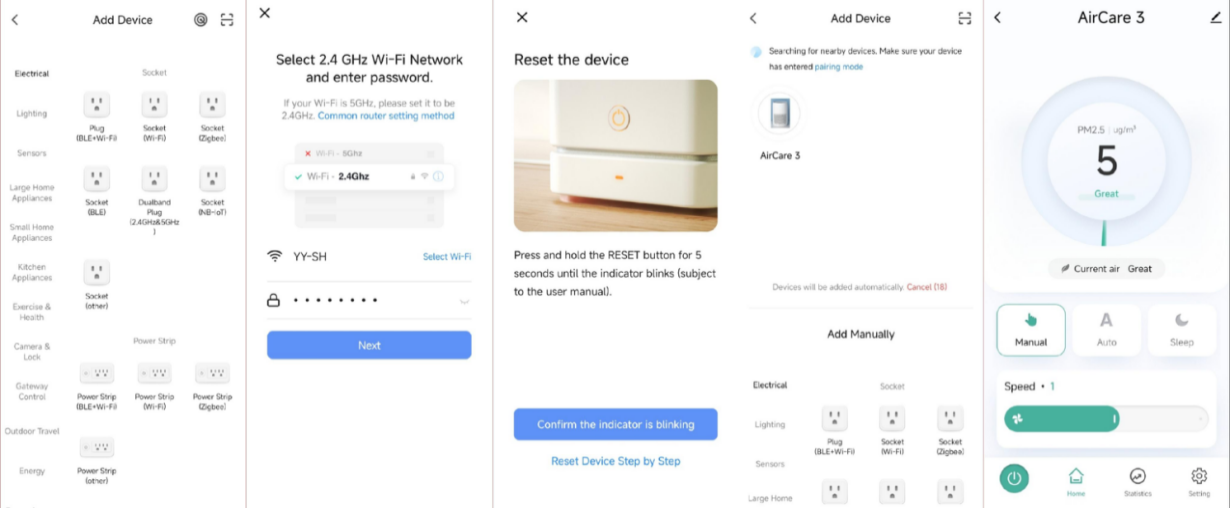
Note:
After successful connection, the Wi-Fi indicator will remain illuminated. Now you can control the device via the app.
Long press the Wi-Fi button for approximately 3s; the device will disconnect from the network and the Wi-Fi indicator light will turn off.
*Machine alarm function:
Error Code E1: Regardless of whether the device is in operation or standby mode, opening the top panel will trigger three short alarm beeps. At this time, all buttons will be invalid, indicator lights will turn off, the display will show "E1", and all currently running functions will pause. After reinstallation, the buzzer will sound once, and the device will revert to its previous standby or working mode.
Error code E2: This code indicates an abnormal motor speed. During device operation, if abnormal motor speed is detected (abnormal FG feedback signal), the main control chip will continuously monitor the abnormal signal for 10s before turning off the motor. At this time, the screen displays "E2". To clear this error, turn off the device and then start it again.
IV. Cleaning Maintenance
- Before cleaning, unplug the power cord and allow the device to cool down.
- Please wipe the exterior of the machine with a damp towel. Do not submerge the entire unit in water or rinse it under a faucet.
- Do not clean with steel wool, abrasive cleaner, or corrosive liquid.
- Please allow all product components to dry completely before storing.
- This product should be stored in a dry, cool place during prolonged storage. Keep away from dust, high temperatures, and direct sunlight.
- The external pre-filter should be cleanedmonthly to prevent excessive accumulation of dust particles, thereby enhancing filtration efficiency and extending the filter's lifespan.
- Use a soft-bristled brush or vacuum hose to clean the pre-filter, removing hair, dust, and large particles.
- Please do not wash the filter with water or other liquids.
- After the filter's lifespan ends, please replace it with a new one.
- If the air purifier is not used for more than 30 days, it is recommended that you remove all filters from the device and store them in a moisture-proof plastic bag. Composite filter elements must be individually stored in moisture-proof plastic bags.
V. Cautions
- This product is not suitable for use by persons with physical, cognitive, or mental impairments, or those lacking knowledge or experience, including children, unless under the direct supervision and guidance of a responsible adult.
- Do not allow children to play with this product.
- Keep this product and the power cord out of the reach of children.
- Before use, ensure the marked voltage matches your local mains supply. Only use the original or manufacturer-specified power cord and charger.
- Do not use if the plug, power cord, or product is damaged. Do not disassemble or modify the product yourself. Contact customer service immediately if any problem occurs.
- Do not plug or unplug the power cord or operate the device with wet hands.
- If smoke, unusual odors, excessive heat, deformation, or other problems occur during operation or charging, immediately disconnect the power and cease use. Contact customer service if necessary.
- This product is only suitable for household use. It is prohibited for commercial or professional use or functions other than those labelled in the manual. If the operation is not carried out in accordance with the instructions in the manual, the warranty will be invalid and the manufacturer will not be responsible for any losses.
- This product must be used under supervision, and it is prohibited to operate the device when no one is around. Please disconnect the power supply before leaving/ assembling / disassembling / cleaning / repairing.
- Before first use, remove the plastic packaging from the filter element.
- Please ensure a ventilation gap of 30cm is maintained around the device.
- To reduce the risk of fire, electric shock or personal injury, do not use replacement parts not recommended by the manufacturer.
- This device should only be used in rooms where the temperature is between 4°C and 43°C.
- Do not place the device on soft surfaces such as beds or sofas, as this may cause it to tip over and obstruct the air inlet and outlet.
- Do not place any objects on top of the device.
- Do not move or tilt the machine during operation.
- Do not insert fingers or objects into the air inlet and outlet.
- Do not use outside. This device is intended for indoor use only. Please avoid exposure to strong sunlight and rain.
- Do not use the equipment near water sources, in damp conditions, or in environments with high humidity to prevent electric shock.
- Do not place the device directly under an air conditioner to prevent any moisture from entering the air purifier.
- Keep the machine away from heating surfaces and open flames, such as stoves, ovens, radiators, or computers.
- Before unplugging the device, ensure the power supply is turned off.
- Before moving or cleaning the machine, opening the bottom cover, or replacing the filter, please unplug the power cord.
- This device cannot remove carbon monoxide or radon gas and should not be used to prevent or eliminate accidents caused by combustion or hazardous chemicals.
- To reduce the risk of fire or electric shock, do not use this fan with any solid-state speed control device.
Ⅵ.Common Problem
|
Problem |
Solution |
|
Air purifier does not operate or buttons are unresponsive |
Plug in the machine |
|
Check whether the power cord is damaged. If so, stop using the device immediately and contact Customer Support |
|
|
Try a different power outlet |
|
|
Long press the child lock button for 2s to turn off the child lock; the corresponding indicator light will turn off |
|
|
The air purifier may be malfunctioning, please contact Customer Support. |
|
|
Significant reduction in airflow |
Make sure the plastic packaging on the filter has been removed and the filter is properly installed |
|
Keep the device at least 30 cm away from walls to avoid blocking the air inlet |
|
|
The filter may be clogged by large particles such as hair or lint. Please clean the filter surface |
|
|
The filter may have reached the end of its service life. Replace it with a new filter. |
|
|
Unusual noise and weak airflow |
Make sure the plastic packaging on the filter has been removed and the filter is properly installed |
|
Make sure the air purifier is placed on a hard, flat, even surface |
|
|
Replace the filter with a new one |
|
|
The air purifier may be malfunctioning or contain foreign objects inside. Stop using it immediately and contact customer service. Do not attempt to repair it yourself |
|
|
Strong unpleasant odor emitted from the machine |
Replace the filter with a new one |
|
Make sure not to use your purifier in an area with high humidity |
|
|
Please contact customer service |
|
|
Wi-Fi connection failed |
Reconnect to Wi-Fi: Long press the Wi-Fi button for 2 s to start the setup process. |
|
Filter indicator light flashing |
Replace with a new filter. After replacement, long press this button for 2s. The indicator light will flash for 2s before turning off. |
|
Device indicator light is yellow/red |
PM2.5 concentration is high. Simply continue normal use |