

Ⅰ. Product Parameters
|
Product Name |
MODEL NO |
Rated Power |
Rated Voltage |
Rated Frequency |
|
Instant Hot Water Dispenser |
X22 |
2200W |
220-240V~ |
50-60Hz |
Ⅱ . Product Illustration
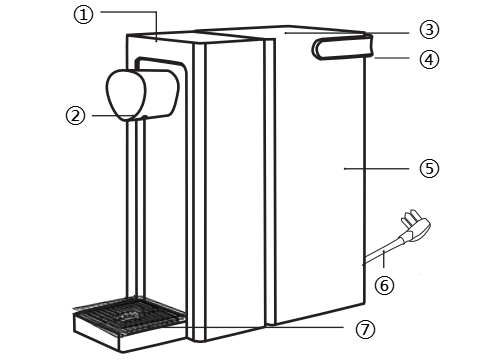
①Control Panel
②Water Outlet
③Water Tank Lid
④Water TankHandle
⑤Water Tank
⑥Power Cord
⑦Drip Tray
The illustrations of products, accessories, user interfaces, etc., in this manual are for illustrative purposes only and are provided for reference.
*Due to product updates and upgrades, the actual product may differ slightly from the illustration. Please refer to the actual product.
III. Operation Instruction
3.1 Installation Instruction
① Filter Installation (Products include a filtered version and non-filtered version; the non-filtered version does not require filter installation)
- Take out the filter element and its holder.
- Insert the filter correctly into the filter holder andpress firmlyto ensure it is properly installed.
- Place the assembled components steadily into the designated position inside the water tank.
② Drip Tray Installation
- Align the drip tray with the slots beneath the device. Gently press down until you hear a “click” to confirm proper installation.
- If you need to remove it, lift the drip tray upward. When it disengages from the slots, slide it outward.
③ Water Tank Filling and Installation
- Take out the water tank and clean its interior to remove dust and debris.
- Fill the tank with water, ensuring the water level does not exceed the maximum line or fall below the minimum line marked on the tank.
- Place the water tank cover on and install the water tank onto the main unit.
Note:
*Please fill with hot water or tap water;
*Do not carry the water tank with one hand to prevent dropping.
3.2 Usage Steps
- Power on: After connecting the power supply, the water dispenser emits a "beep" sound. All indicator lights illuminatefor 1s and then turning off, indicating the device has entered working mode. The ambient light of the dispensing outlet automatically illuminates. The default temperature is 25°C, and the cup size is set to small (200ml).
- Unlock: Press the lock button. After hearing a “beep” and all buttons illuminate, the ambient light turns on, indicating successful unlocking.
*The dispenser automatically locks after 30s of no operation. Only the Child Lock button remains illuminated while all other buttons and the dispenser outlet ambient light turn off.
- Dispensing Water: In unlocked mode, select your preferred water volume and temperature, then press the dispense button to dispensing. Dispense completes after hearing a “beep” sound. Press the dispense button again during the process to manually stop dispensing. After stopping, a short delay may occur to prevent dry heating—this is normal.
- Cup Size: Press the cup size button to select different water volumes (Small cup approximately 180–220mL Medium cup approximately 315–385 mL Large cup approximately 450–550 mL).
- Temperature Adjustment: Press the temp button to set the desired water temperature. Common settings include 25°C, 45°C, 65°C, 85°C, and boiling water. Long press the temperature adjustment button to adjust the temperature in 1°C increments.
- Babymilk Preparation: Press the babymilk button to automatically set the water temperature to 45°C.
|
Water temperature setting |
Display temperature |
Outlet temperature |
|
Ambient temperature |
25°C |
Ambient temperature |
|
45°C |
45°C |
45 ± 2°C |
|
65°C |
65°C |
65 ± 2°C |
|
85°C |
85°C |
85 ± 2°C |
|
Boiled water |
H1 |
Approximately 93–99°C |
* All temperature test data above are from Simplus laboratory.
* The outlet water temperature may differ slightly due to factors such as voltage, ambient inlet water temperature, and altitude.
- Manual Boiling Point Adjustment: The water dispenser can adjust its boiling point according to altitude to prevent excessive steam causing abnormal work. After powering on, when the water dispenser displays the "[ ]", long press the babymilk button for 5s until the digits begin flashing. Please adjust the boiling point temperature (85-99°C) using the temperature control button according to your actual usage.After adjusting, long press the babymilk button to complete the setting.
- Descaling: Following the instructions for your citric acid product, add the diluted citric acid solution to approximately 1/3 of the water tank (about 1.0L). Place a container of at least 1.5L capacity under the water outlet to collect the discharged hot water. Set the temperature to boiled water and the cup size to large. After dispensing water twice, please empty the remaining water in the tank and clean the tank. Add approximately 1.0L of ambient-temperature purified water, then press the dispense button again to complete descaling.
*Do not drink the discharged hot water during descaling. Take care to prevent overflow during cleaning and descaling.
3.3 Function Button Instructions
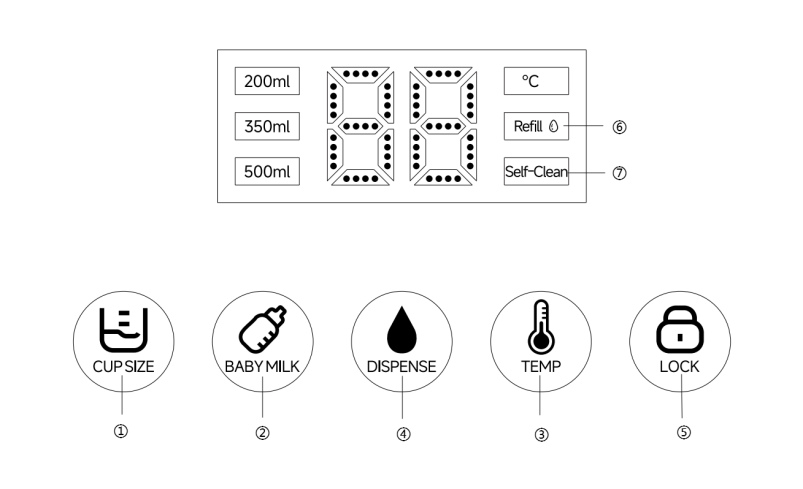
① Cup Size
Press to select different water volumes (small cup 200mL, medium cup 350mL, large cup 450mL).
② Babymilk
Press to automatically set temperature to 45°C (ideal babymilk preparation temperature), while maintaining the previously selected cup volume.
③ Temp
Short press to switch between different temperatures (25°C-45°C-65°C-85°C-H1), “H1” indicating boiled water. Long press for 1-2s to enter stepless temperature adjustment mode, with each adjustment increment of 1°C within the range of 25°C-95°C.
④ Dispense
After selecting the desired cup size and temperature, place a suitable cup on the drip tray. Press this button to start dispensing water. To stop dispensing, press the button again. After stopping, a short delay may occur to prevent dry heating—this is normal.
⑤ Lock
If no operation occurs within 30s after startup, the child lock automatically activates and the ambient light turns off. Press this button to unlock.
⑥ Refill
- Low water level: When water in the tank is below minimum level, the dispense button will continuously flash, indicating you need to refill. Dispense function remains operational during this time.
- Empty water alert: When the water tank is depleted, the refill indicator will automatically illuminate, indicating the need to refill. At this time, water dispensing is unavailable.
⑦ Self-Clean
- Cleaning reminder: After continuous water dispensing for 10h, the self-clean indicator will automatically illuminate, reminding you to clean and maintain the device (the device remains operational during this indicator’s illumination and does not affect daily use).
- Start cleaning: Place a container with a capacity of no less than 500mLunder the wateroutlet. Simultaneously long press the cup size and dispense buttons for 2s to start automatic dispensing. The water temperature is approximately 90°C. Take care to avoid scalding.
- Cleaning completed: The self-clean indicator will automatically turn off, and the device will resume normal operation.
IV. Cleaning and Maintenance
- Before cleaning, unplug the power cord and allow the device to cool down.
- Please wipe the outer shell and heating panel with a soft dry cloth. Do not use hard objects to avoid scratching the product surface.
- Do not submerge the entire unit in water or rinse it under a faucet.
- Do not clean with steel wool, abrasive cleaner, or corrosive liquid.
- Please allow all product components to dry completely before storing.
- This product should be stored in a dry, cool place during prolonged storage. Keep away from dust, high temperatures, and direct sunlight.
- If not using for a long period, unplug the power cord and empty the water tank. Please run the cleaning program before using again.
- Water should not be stored in the tank for more than 48h. Please clean the tank regularly.
- Please use purified water. Using tap water or poor-quality water may cause reduced dispensing water, clogging, scaling, and may shorten the device's lifespan.
- It is recommended to replace the filter every 3 to 6 months.
Ⅴ. Cautions
- This product is not suitable for use by persons with physical, cognitive, or mental impairments, or those lacking knowledge or experience, including children, unless under the direct supervision and guidance of a responsible adult.
- Do not allow children to play with this product.
- Please keep this product out of the reach of children.
- Before use, ensure the marked voltage matches your local mains supply. Only use the original or manufacturer-specified power cord and charger.
- This product must be plugged into an earthed socket and ensure it is securely fitted.
- If the plug, power cord or the product itself is broken, cracked, leakage, etc., it is prohibited to use. Do not disassemble or modify the product by yourself. If there is any abnormality, please contact customer service in time.
- Do not plug or unplug the power cord or operate the device with wet hands.
- If smoke, unusual odors, excessive heat, deformation, or other problems occur during operation or charging, immediately disconnect the power and cease use. Contact customer service if necessary.
- Do not use outside. This product is only suitable for household use. It is prohibited for commercial or professional use or functions other than those labelled in the manual. If the operation is not carried out in accordance with the instructions in the manual, the warranty will be invalid and the manufacturer will not be responsible for any losses.
- This product must be used under supervision, and it is prohibited to operate the device when no one is around. Please disconnect the power supply before leaving/ assembling / disassembling / cleaning / repairing.
- Please place the device on a stable surface.
- Do not exceed the maximum line. Never add hot water, ice cubes, or other mixed liquids such as milk or juice.
- When moving the device, some residual water may remain in the outlet. Take care to avoid scalding.
- Products without filter must only be filled with purified water. Do not add any other liquids.
- Products undergo water discharge testing before factory shipment. Residual water may be present in the tank and outlet, which is normal.
- Due to the effects of voltage, altitude, and ambient temperature, the dispensing water and temperature may vary, which is a normal.
- Unplug the device when it is empty, refilling water, not in use, being cleaned, or moved.
- Do not place electrical devices against walls or in close proximity to other devices. Leave at least 5 cm of space around the back, sides, and top of the appliance for heat dissipation.
VI. Common Problems
|
Common Problems |
Possible Reasons |
Solution |
|
Unable to power on |
Poor power connection (no power at the outlet) |
Replace the socket |
|
Not working |
Child lock not released |
Long press the child lock button for 3–5s to unlock |
|
No water output |
Water tank is empty or not properly installed |
Check the water tank level line and ensure the tank is properly installed |
|
Outlet clogged |
Use a fine needle or cotton swab to clear the outlet |
|
|
No water flowing in |
Inlet pipe blockage |
Disassemble the inlet water pipe and clean the filter screen. Check if the inlet silicone tube is bent. |
|
No heating |
Heating element failure |
Please contact customer service to resolve it |
|
Water leakage |
The water tank is not properly sealed to the main unit |
Inspect if the seal ring is undamaged and ensure the water tank is properly installed. |
|
The drip tray has not been emptied promptly. |
Clean the drip tray |