

Ⅰ. Product Parameters
|
Product Name |
Product Model |
Rated Power |
Rated Voltage |
|
Portable Fan |
F059 |
5W |
DC 5V |
Ⅱ . Product Illustration
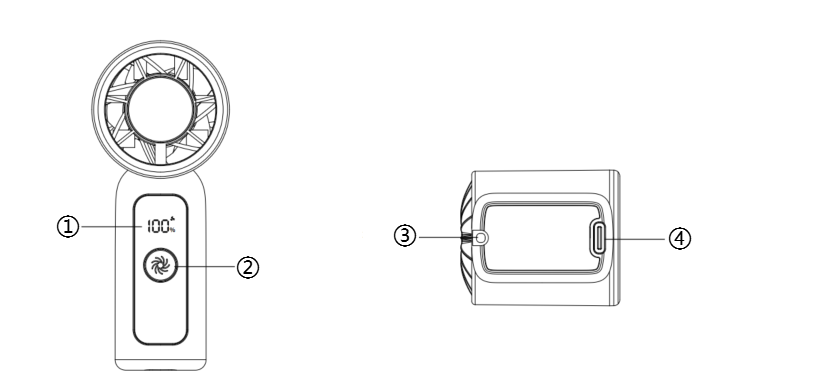
III. Operating Instructions

-
Power on: Long press the power button to start the fan, which defaults to speed 1, and the screen displays the setting number "1".
-
Power off: After powering on, short press the power button to switch the fan speed to “100,” or long press the power button to activate stepless speed adjustment to “100.” Short press again to turn off the device.
-
Fixed speed control: The device defaults to speed 1 when powered on (displaying “1”). Short press the fan speed adjustment button switch fan speed (Speed 1 displays “1”; Speed 2 displays “25”; Speed 3 displays “50”; Speed 4 displays “75”; Speed 5 displays “100”).
-
Stepless speed control: After turning on the fan, long push the lever to activate the stepless speed adjustment function. The display will show numbers ranging from 1 to 100. Release the button to set the current speed(After the fan speed reaches “100” it will not automatically return to “1” Long press again to return to stepless speed adjustment).
-
Charge with the 5V charger and Type-C charging port.
-
During charging, the display numbers flash, and when fully charged, it shows "100%".
-
Within 3s of powering on or adjusting speed, the display shows the current gear.
-
After 3s of no operation, the display shifts to show remaining battery power.
Ⅳ. Cleaning and Maintenance
-
Before cleaning, ensure the device is turned off and the charging cable is unplugged.
-
The fan cover is not detachable. Clean the surface of the fan cover and the air intake mesh using a clean cloth and soft brush.
-
Do not use water or other liquids to clean electrical components (such as the motor, power switch, etc.).
-
Do not touch electrical components with wet hands or damp cloths.
Ⅴ. Cautions
-
To ensure safety, this product has complied with all applicable standards and regulations. Please read the user manual carefully before using this product,and keep it for future reference.
-
This product is not suitable for use by persons with physical, cognitive, or mental impairments, or those lacking knowledge or experience, including children, unless under the supervision and guidance of a responsible adult.
-
Do not allow children to play with this product.
-
Keep this product and the power cord out of the reach of children.
-
Before use, ensure the marked voltage matches your local mains supply. Only use the original or manufacturer-specified power cord and charger.
-
Do not use if the plug, power cord, or product is damaged. Do not disassemble or modify the product yourself. Please contact customer service immediately if any problem occurs.
-
Do not plug or unplug the power cord or operate the device with wet hands.
-
If smoke, unusual odors, excessive heat, deformation, or other problems occur during operation or charging, immediately disconnect the power and cease use. Contact customer service if necessary.
-
This product is only suitable for household use. It is prohibited for commercial or professional use or functions other than those labelled in the manual. If the operation is not carried out in accordance with the instructions in the manual, the warranty will be invalid and the manufacturer will not be responsible for any losses.
-
This product must be used under supervision, and it is prohibited to operate the device when no one is around. Please unplug the power supply before leaving/ assembling / disassembling / cleaning / repairing.
-
This is a handheld device. Please place the device horizontally for charging.
-
This product is a handheld device; please place the unit horizontally when charging.
-
Do not touch the fan blades with fingers or other objects while the fan is operating.
-
Please keep the fan away from hair or other items that may get caught in the air intake.
-
If the product is not used for an extended period, please charge it once every three months to prevent battery damage.
-
Do not strike or drop the product to avoid malfunction.
-
Please use the Tpye-C charging cable and 5V charger for charging.
-
Please charge fully before first use.
-
Do not block the air inlet or outlet.
VI.Common Problems
|
Common Problem |
Possible Reason |
Solution |
|
Unable to Power On |
Low battery |
Please charge the device before use. Charge using a 5V charger and a Type-C charging port |
|
Power button not pressed long enough |
Long press the power button to start |
|
|
Unable to Power Off |
Incorrect power button operation |
Method 1: Short press the power button to switch the fan speed to “100”. Method 2: Long press the power button to activate stepless speed adjustment to “100”. Short press again to power off. |
|
Speed adjustment does not display specific values |
Incorrect power button operation |
Long press the power button to enable stepless speed adjustment. The display will show numbers between 1 and 100. Release the button to lock the current speed setting (Note: After reaching “100”, the speed will not automatically reset to “1”. Long press again to resume stepless adjustment). |